
Blaminhor Essentials vs WPMasterToolKit: An Honest Match
I installed WPMasterToolKit next to my own plugin for an honest comparison: modules, pricing, philosophy — and a verdict tailored to your profile.

Comparing your own product to a competitor is about the riskiest exercise there is: I’m the author of Blaminhor Essentials, and WPMasterToolKit is probably its most direct competitor. So you have every reason to distrust this comparison — and you’d be right to. Which is why I did the only honest thing I could: I installed WPMasterToolKit on a test site, counted its modules one by one, went through its pricing grid line by line, and I’m going to tell you in plain terms where it beats my plugin. Because it does, on several counts.
The essentials
- WPMasterToolKit: 128 modules on my installation’s counter (97 free + 31 Pro), version 2.22.0, more than 5,000 active installations and a 5/5 rating (27 reviews) on WordPress.org.
- Its Pro version costs from $30/year (1 site) to $246/year (500 sites), with a free 15-day trial.
- Blaminhor Essentials: 26 modules, all free (GPL license), 4 of them still in beta — no paid tier, no telemetry.
- Two opposite philosophies: a wall of small à-la-carte switches versus a small number of big, complete machines.
- The two plugins coexist without conflict on my test site, as long as you never enable the same function twice.
What exactly is WPMasterToolKit?
WPMasterToolKit (WPMTK for short) is an “all-in-one” plugin developed by Webdeclic, a French web agency founded in 2017. It bundles 128 individually switchable modules — admin micro-tweaks, security hardening, cleanup, developer tools — 97 of them free and 31 reserved for the Pro version.
And let me say it right away: this is serious work, maintained with impressive regularity. The day I tested it, the latest update was only hours old. The official listing shows 5/5 across 27 reviews, the plugin runs on PHP 7.4 and up, and every module comes with a link to its documentation. You can feel the internal agency tool, polished by years of real-world use on their clients’ sites.
Its philosophy fits in one image: the wall of drawers in a workshop. Dozens of small labeled bins, one per screw: disable emojis, hide the WordPress version, turn off XML-RPC, ban disposable email addresses, regenerate the salt keys… Each drawer does one small thing, and you only open the ones you need.
And what does Blaminhor Essentials do differently?
Blaminhor Essentials follows the opposite logic: few modules, but each one has the ambition to replace a major plugin all by itself. The SEO/GEO module replaces a Yoast, the Cache module replaces a full performance plugin, the Backup module replaces an UpdraftPlus, the cookie banner replaces a GDPR consent plugin. I’ve detailed everything it contains in my presentation of Blaminhor Essentials, the modular free plugin.
To stretch the workshop metaphor: facing the wall of drawers, this is a workbench with a few big machines — fewer of them, but each does the job of an entire professional tool.
Let’s be honest about the weaknesses too, since that’s the contract of this article. Blaminhor Essentials is the younger of the two on the official repository, with inevitably fewer installations and fewer reviews than its elder. Four of its modules — the events calendar, the forms, Login Security and Downloads — are still flagged “beta”. And it requires PHP 8.1 at minimum: if your host is dragging along an old PHP version, WPMasterToolKit will welcome you, Essentials won’t.
97 free modules versus 26: who actually gives you more?
Neither: counting modules compares nothing, because the two plugins don’t slice up their features at the same scale. In WPMasterToolKit, “disable emojis”, “hide the WordPress version” and “turn off the RSS feed” count as three modules. In Blaminhor Essentials, the Cache module alone bundles page caching, minification, image lazy-loading, local hosting of Google Fonts, and a Web Vitals dashboard — one module on the counter, five plugins replaced.
So the real question isn’t “how many?” but “which ones?”. Here’s what I found by cross-checking the two official lists:
- What WPMasterToolKit has that Essentials doesn’t: Adminer and a file manager, code snippets, a vulnerability scanner (Pro), temporary logins, plugin and theme rollback, and dozens of “disable X” micro-tweaks you won’t find anywhere else without writing code — the kind of need that once made me write about how to run PHP only for administrators.
- What Essentials has that I couldn’t find anywhere in WPMTK’s 128 modules: scheduled backups with restore, a full SEO module (meta titles, sitemaps, Google preview), a GDPR consent banner with Google Consent Mode v2, a broken link scanner, a form builder, and an events calendar with appointment booking.
In other words, the two plugins overlap less than you’d think. They share the common core (SMTP, redirects, content duplication, maintenance mode, login page hiding — and, since Essentials’ Login Security module, still in beta, login attempt limiting and two-factor authentication), but their true specialties are almost disjoint: fine-grained admin tooling on one side, big-plugin replacement on the other.
How does it feel in practice? I installed it to find out
I installed WPMasterToolKit 2.22.0 from the official repository on my test site — the very one running Blaminhor Essentials. Installed in thirty seconds, no conflict between the two plugins, and a single settings page listing all 128 modules with a counter per category: 34 modules for security alone, 28 for content and media, 12 for debugging.
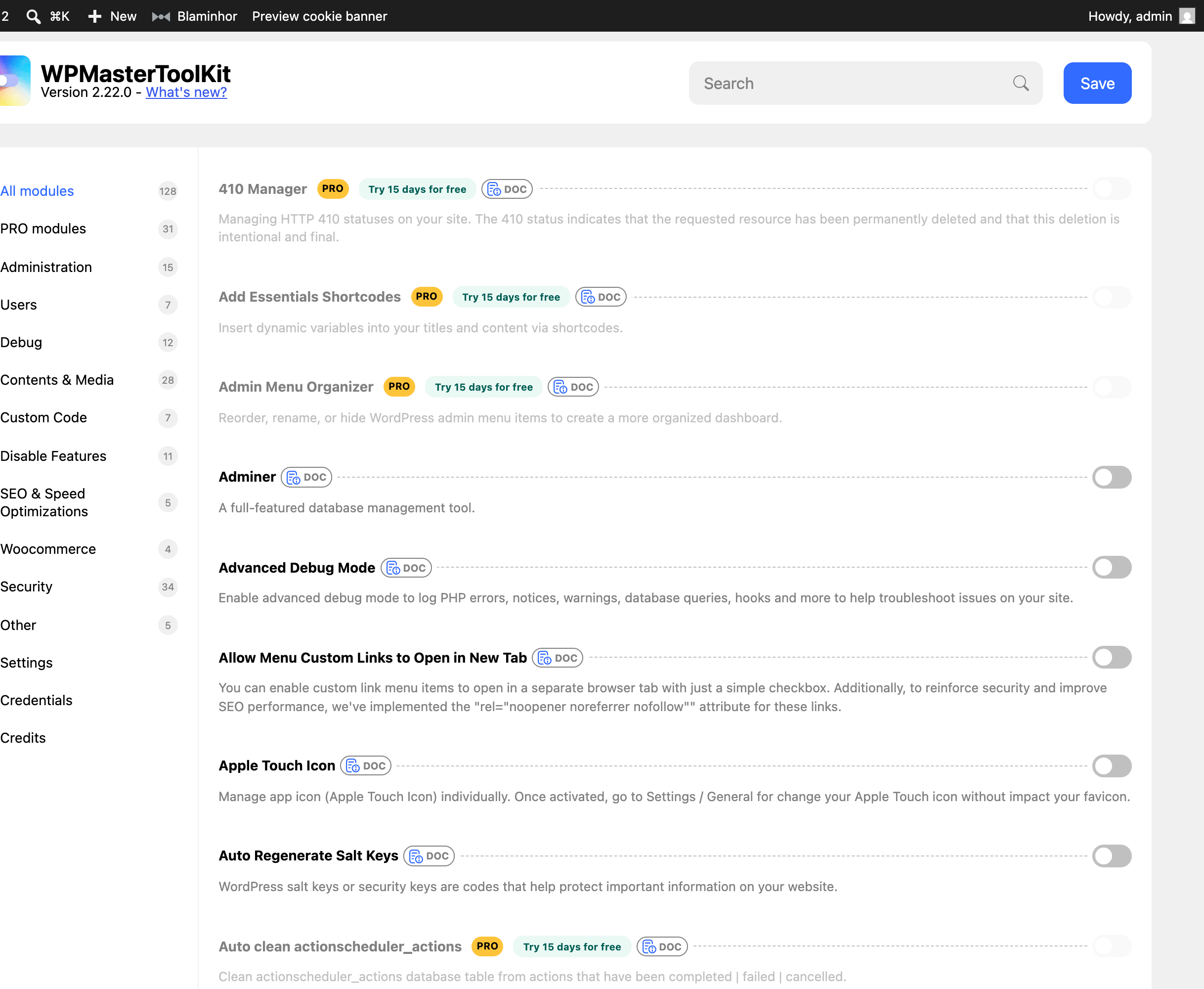 WPMasterToolKit’s 128 modules on my test site. Each module has its toggle, its documentation, and — for 31 of them — a PRO badge with a 15-day trial.
What I genuinely appreciated: the interface is clean, the search filters modules instantly, every module links to its documentation, and everything is disabled by default — exactly the right approach, the one Essentials follows too. The “Block 404 PHP File Scanning” module, which returns a 403 to bots probing for non-existent PHP files, is the kind of sharp idea you only find among people who administer a lot of sites.
What gave me pause: the 31 Pro modules are displayed among the free ones, locked, with their trial button. That’s fair game commercially, but some of the locks are surprising — disabling comments, reorganizing the admin menu, or upgrading password hashing (Argon2) are basic settings you don’t expect to find behind a paywall. In Essentials, disabling comments is a free module like any other.
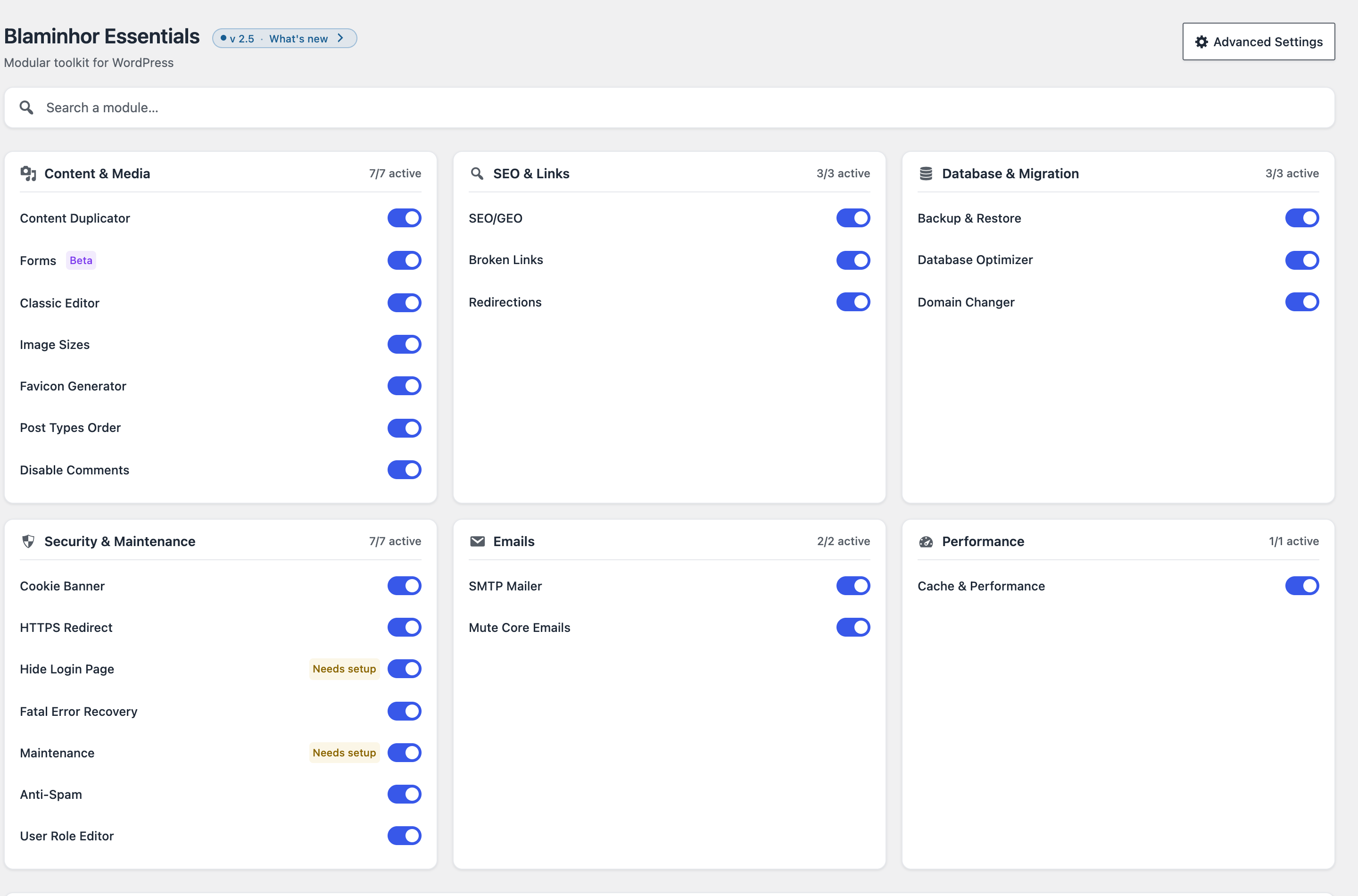 On the other side, Blaminhor Essentials’ dashboard: fewer switches, but no badges, no locks, no paid tier.
The comparison in one table
| Criterion | WPMasterToolKit | Blaminhor Essentials |
|---|---|---|
| Publisher | Webdeclic, French web agency (2017) | Blaminhor (me, in full transparency) |
| Modules | 128, of which 97 free + 31 Pro | 26, all free (4 in beta) |
| Price | Free, Pro from $30 to $246/year | 100% free, no paid version |
| Philosophy | Wall of à-la-carte micro-tweaks | Few modules, each replaces a major plugin |
| Full SEO, cache, backups, GDPR cookies, forms, calendar | Absent from the module list | Dedicated modules included |
| Adminer, snippets, vulnerability scan, temporary logins | Included (scan in Pro) | Absent, by deliberate scope |
| Two-factor authentication, login attempt limiting | Included (2FA in Pro) | Included (Login Security module, in beta) |
| Minimum PHP | 7.4 (WordPress 6.0+) | 8.1 |
| Impact of a disabled module | Negligible (reported ~3 KB of memory) | Zero code loaded: no PHP, no query, no asset |
What does each solution actually cost?
For Blaminhor Essentials, the answer fits in one word: nothing. All 26 modules are free — no account to create, no telemetry, no Pro version lying in wait around the corner. It’s a business-model choice, not a promotion.
For WPMasterToolKit, the honest answer is: nothing, as long as the 97 free modules are enough for you — and they will be for a lot of people. If you want vulnerability scanning, the CRON task manager, or login page customization, the Pro pricing grid starts at $30/year for one site and climbs to $246/year for 500 sites — a rate that becomes very competitive for an agency managing a whole fleet. A 15-day trial, a 14-day refund window: the terms are healthy.
And I want to be clear on one point: Webdeclic’s freemium model is perfectly legitimate. An agency funding the continuous development of a tool through a Pro version is an honest contract with the user. I simply made a different choice for Essentials, and that choice has its acknowledged downside: no dedicated support team behind it, whereas WPMTK’s Pro plan includes priority support.
Which one should you choose for your situation?
After running them side by side, here’s my verdict — and by now you know exactly where I’m speaking from:
- You’re a developer or you administer many sites, you want Adminer at hand, snippets, temporary logins for your contractors, and fifty micro-tweaks without writing a line of code → WPMasterToolKit, no hesitation. That’s its home turf, and it’s excellent there.
- You run one or a few sites and your goal is to shrink the bill and the plugin stack — replacing your SEO plugin, your cache, your backups, your SMTP and your cookie banner with a single free tool → Blaminhor Essentials covers all of that with no paywall.
- Still undecided? Install both: they coexist without conflict. Take the big machines from one, the drawers of screws from the other, and just make sure you never enable two modules that do the same job.
Maybe the best news in this comparison is this: either way, the era of stacking fifteen single-purpose plugins is drawing to a close — and that’s a win for every WordPress site, whichever side you pick.
– blaminhor
FAQ
Is WPMasterToolKit really free?
Partly. The free version of WPMasterToolKit includes 97 modules, which is already very generous. The remaining 31 modules (two-factor authentication, vulnerability scanning, disabling comments, admin menu organization…) require the Pro version, priced from $30/year for one site up to $246/year for 500 sites, with a 15-day trial.
Can you install Blaminhor Essentials and WPMasterToolKit together?
Yes — I did it on my test site without any conflict. Since both plugins are modular, the only rule is to never enable two modules that do the same job: pick a single SMTP handler, a single maintenance mode, a single redirect manager, and a single content duplicator.
Who develops WPMasterToolKit?
WPMasterToolKit is developed by Webdeclic, a French web agency that has been active since 2017. The plugin is maintained very actively (it was updated the very day I tested it), counts more than 5,000 active installations, and shows a 5/5 rating on WordPress.org, with 27 reviews as I write this.
Does Blaminhor Essentials offer two-factor authentication (2FA)?
Yes, since version 2.6.0, through the Login Security module — still flagged beta. It covers two-factor sign-in (authenticator app, security key or passkey, emailed code, single-use backup codes), brute-force throttling on every sign-in route, a password policy and a sign-in journal, all on your own server with no external service. What Blaminhor Essentials still doesn't offer is a vulnerability scanner or a firewall: WPMasterToolKit Pro provides the scanner, and dedicated plugins cover the rest.
What are the minimum requirements for each plugin?
WPMasterToolKit runs on PHP 7.4 and WordPress 6.0 and up, which makes it compatible with older hosting environments. Blaminhor Essentials requires PHP 8.1 at minimum: a deliberate technical choice (modern code, strict typing), but one that rules out servers that haven't been updated in years.
Do these "all-in-one" plugins slow down a WordPress site?
No, and that's their shared strength: both are modular. WPMasterToolKit reports a memory footprint of a few kilobytes, and Blaminhor Essentials loads strictly no code (PHP, queries, assets) for a disabled module. In both cases, the real weight depends solely on the modules you enable.
Comments