
How to Fix 404 Errors From ChatGPT in WordPress
ChatGPT invents URLs that look real—and sends visitors to your 404 page. Here's how to catch those hallucinated addresses and redirect them in one click.

Someone asks ChatGPT a question. It gives a genuinely helpful answer, recommends your site—your site!—and hands over a link. The visitor clicks, lands on your page and… « 404 – Not found ». The link never existed: the AI made it up. This isn’t a rare glitch, it’s now a measured, documented pattern across every AI assistant, and it’s quietly costing you the most motivated visitors you’ll ever get. The good news: catching those invented URLs and turning them into working redirects takes about ten minutes to set up. Let me show you.
The essentials
- SE Ranking analyzed 145,463 URLs cited by ChatGPT (December 2025): 1.34 % returned a client error, and 91 % of those errors were 404s.
- ChatGPT links to dead pages about twice as often as Google’s AI Overviews (1.22 % of cited URLs vs 0.56 %) and roughly twice as often as classic organic results (0.65 %).
- In a separate real-world audit, Go Fish Digital found 3.35 % of visits sent by ChatGPT landed on a 404—about one broken visit for every 30 clicks, across 18,000+ landing pages.
- The fix is not blocking AI—it’s logging your 404s with their referrer, then redirecting the invented URLs to the closest real page.
- Blaminhor Essentials does this natively: 404 monitor with referrer and hit count, plus a one-click 301—and a WP-CLI mirror (
wp blaminhor redirections 404-list).
Why does ChatGPT send visitors to pages that don’t exist?
Because a language model doesn’t look up URLs—it predicts them, one piece at a time, exactly like it predicts the next word of a sentence. When an assistant wants to link to your pricing page and hasn’t stored the real address, it completes the pattern with what a pricing URL usually looks like: /pricing, /plans, /tarifs. Often the guess is right. When it’s wrong, the model has just invented—« hallucinated », in AI jargon—a page you never created.
Three flavors of this problem show up in the data:
- Pure inventions: URLs that never existed anywhere. The model assembled a plausible slug out of thin air.
- Stale memories: the page existed when the model was trained, but you’ve since renamed, merged or deleted it. The AI’s snapshot of your site is months or years old.
- Mangled copies: a real URL with a typo, a truncated ending, or two paths spliced together.
And it’s not just ChatGPT, even if it’s the biggest offender. The SE Ranking study measured dead links across ChatGPT (1.22 % of cited URLs), Google’s AI Mode (0.87 %) and AI Overviews (0.56 %)—all above zero, and the assistants people click from the most sit at the top. Search Engine Journal summed it up: AI search sends users to 404 pages nearly three times more often than Google’s classic results.
How do you find the 404s that AI assistants create?
The magic word is « referrer »: when a visitor clicks from ChatGPT, their request carries chatgpt.com as the referring site—so a 404 log that records referrers shows you exactly which dead URLs the AI is sending people to. The same goes for perplexity.ai, Claude’s claude.ai, or Gemini traffic. No referrer guessing games, no log-file archaeology: the source is written on every hit.
The catch is that WordPress doesn’t record any of this by default. Your classic options each have a hole in them:
- Google Search Console shows 404s that Googlebot crawled—not the ones your human visitors hit five minutes ago from an AI answer.
- GA4 can track 404 hits, but only after you build a custom event setup around your error template. Nobody does this before they have the problem.
- Raw server logs contain everything… on hosts that let you access them, in a format you’ll be grepping at midnight.
A server-side 404 monitor closes the gap: it sits in WordPress itself, notices every request that ends as « page not found », and stores the path, the referrer, and how many times it happened. That last number matters—a URL hit 47 times is a pattern worth fixing; a URL hit once is probably a bot typo you can ignore.
Redirect, rebuild, or ignore: what do you do with each 404?
Not every 404 deserves a fix. Sort each URL by what it tried to reach, and give it one of four answers: a 301 to the closest real page, a brand-new page, a deliberate 410, or nothing at all.
| The 404 you’re looking at | What to do | Why |
|---|---|---|
Close real equivalent exists (/pricing → your /plans page) | 301 redirect | Passes the visitor—and any link signals—to the right destination |
Recurring URL with real intent, no equivalent (AI keeps inventing /api-docs) | Create the page | The AI is showing you demand; Go Fish Digital found these worth building |
| You deleted it on purpose and want it forgotten | 410 Gone | Tells crawlers « stop asking », faster de-indexing than a 404 |
| One-off garbage, bot probes, random strings | Nothing | An honest 404 is the correct answer to a meaningless question |
One trap to step around: do not mass-redirect every 404 to your homepage. Google treats those as soft 404s, and the humans feel it too—they asked for something specific and got dumped at the front door. Redirect only when there’s a genuinely close match, and let the rest 404 with dignity. If you’re hazy on what a 404 actually is, I’ve got a whole definition article for you.
The second row of that table is the counterintuitive one, and it’s my favorite: a hallucinated URL that keeps coming back is free market research. If ChatGPT keeps inventing yoursite.com/templates because that’s what it expects a site like yours to have, real people keep wanting that page. Some SEOs now deliberately build the pages AI keeps making up—the AI already promised the content on your behalf; you just have to keep the promise.
How do you set this up in WordPress with Blaminhor Essentials?
The Redirections module of Blaminhor Essentials ships a 404 monitor and a one-click « redirect » action on every logged entry—here’s the whole setup, and the honest fine print.
- Install Blaminhor Essentials and enable the Redirections module (it’s modular: everything you don’t enable stays off and loads nothing).
- In the module settings, switch on the 404 monitor and pick a retention window—30 days by default, 1 to 365 if you want more or less history.
- Let it run for a few days. Real traffic does the discovery for you.
- Open the 404 Monitor tab: entries are sorted by hit count, and each row shows the path, first/last seen dates, and the referrer—this is where
chatgpt.comgives the game away. - On any row worth fixing, click the redirect action, type the target URL, done. The 301 is live immediately, and the entry disappears from the log—resolved is resolved.
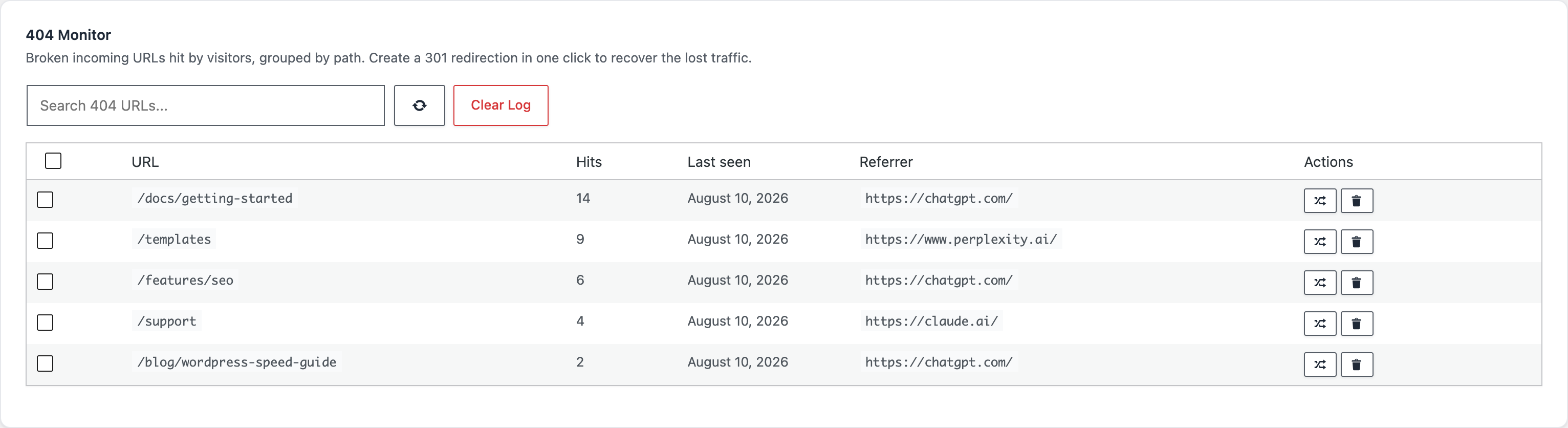
Because the redirect engine runs before the monitor logs anything, a URL you’ve just fixed stops appearing in the list—the log only ever contains your remaining problems, not your solved ones.
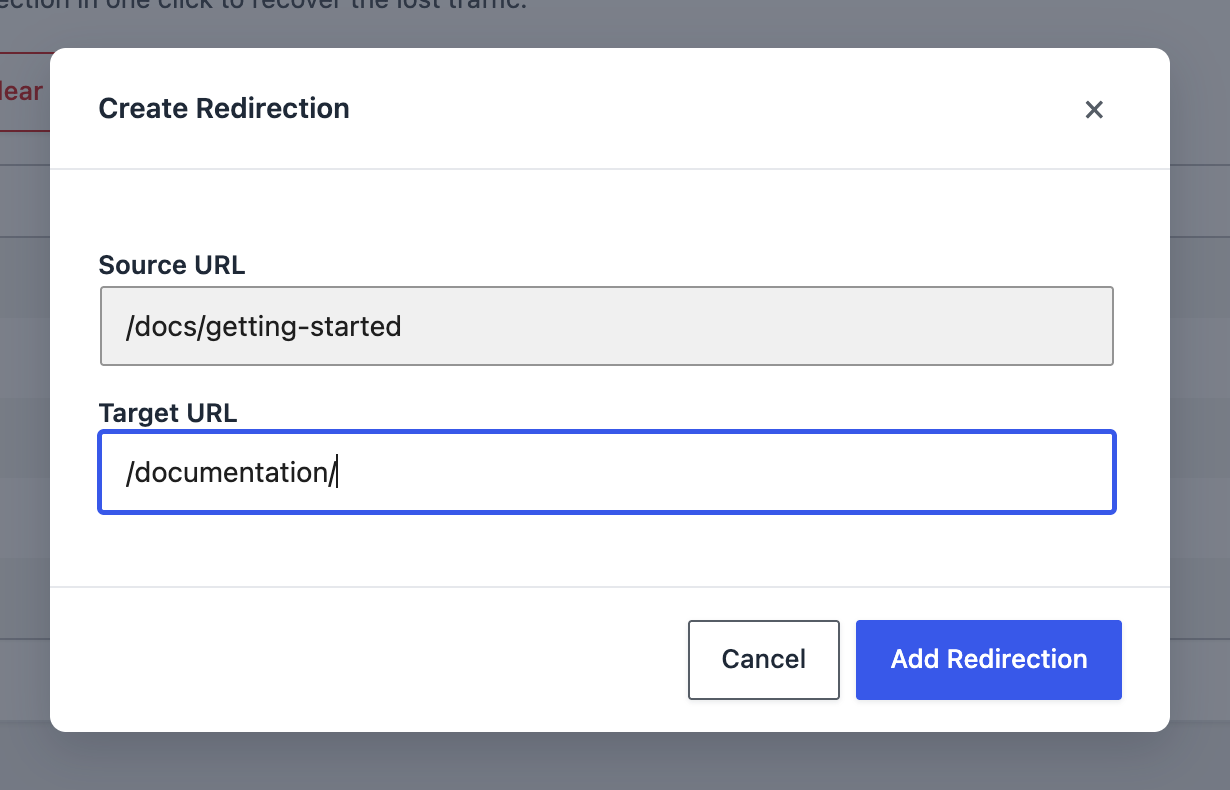
If you live in a terminal (or you let an AI assistant handle your maintenance), every step has a WP-CLI mirror:
wp blaminhor redirections 404-list
wp blaminhor redirections 404-to-redirect 7 --target=/new-page/
The fine print, because you should know what a tool does before trusting it:
- The monitor logs the path only, never query strings—cleaner grouping, and no personal data from URLs ending up in your database.
- It records GET and HEAD requests only, and caps the table at 5,000 distinct URLs, so a bot flooding you with random paths can’t bloat your database.
- A daily cleanup purges entries older than your retention window.
- Redirect rules support plain matches and regex—and a regex that fails at runtime is automatically disabled and logged instead of silently breaking your site.
I set the whole flow up on a clean test site while writing this article: enabled the monitor, hit a handful of invented URLs with a ChatGPT referrer, watched them stack up in the log with their hit counts, then clicked one into a 301. The redirect answered instantly on the next request, and the log entry was gone. From « the AI invented a URL » to « that URL now lands somewhere useful » is genuinely one click.
Can you stop AI assistants from inventing your URLs in the first place?
Not really—the invention happens inside the model, on infrastructure you’ll never touch. What you control is the landing. Still, two habits shrink the problem over time:
- Keep your URLs boring and stable. Every slug change creates a future stale memory in some model’s training data. When you do rename a page, ship the 301 redirect the same minute.
- Help the models learn your real structure. An llms.txt file hands AI crawlers a curated map of your actual pages—no guarantee they’ll use it, but it’s your structure, stated plainly, at a standard address.
And to be clear about the tempting nuclear option: blocking AI crawlers doesn’t fix this. Hallucinated links come from what models already learned or guess—blocking future crawls just means fewer citations for you, while the invented URLs keep coming. If AI assistants are sending you visitors, the winning move is to catch them, not to lock the door.
One click between a lost visitor and a won one
Every hallucinated URL is a visitor who was promised your content and hit a wall instead. You can’t stop AI assistants from guessing—but a 404 log with referrers turns their guesses into a to-do list, and a one-click 301 clears that list faster than ChatGPT can refill it.
The 404 monitor is one module among twenty-plus in Blaminhor Essentials, the modular free plugin I build precisely for this kind of quiet, unglamorous problem—enable what you need, ignore the rest, pay nothing.
FAQ
Why does ChatGPT make up URLs that never existed?
Because a language model predicts text, it doesn't look URLs up. When ChatGPT needs a link it hasn't memorized, it completes the address the way it completes a sentence—yoursite.com/pricing, /docs, /contact—producing a plausible-looking URL. Sometimes that guess matches a real page; when it doesn't, your visitor lands on a 404.
Do 404 errors from AI traffic hurt my SEO?
Not directly—Google has always said random 404s don't hurt rankings, and AI-invented URLs are exactly that. The real cost is the lost visitor: someone motivated enough to click through from an AI answer bounces off a dead page. You fix it for conversions and trust, not for a ranking penalty.
Should I redirect every 404 to my homepage?
No. A blanket redirect to the homepage is treated as a soft 404 by Google and feels broken to humans—they asked for a specific thing and got the front door. Redirect each URL to the closest matching page, and let genuinely meaningless URLs keep returning 404. A honest 404 is better than a misleading redirect.
Can I see AI-caused 404s in Google Search Console or GA4?
Only partially. Search Console reports 404s that Googlebot crawls, not the ones your human visitors hit from ChatGPT. GA4 can surface them, but only if you build a custom setup that tracks the 404 template with its referrer. A server-side 404 monitor logs every miss with its referrer out of the box.
What's the difference between a 301 and a 410 for these URLs?
A 301 says « this content moved, follow me »—use it when a close equivalent exists, it passes visitors and link signals to the right page. A 410 says « this is gone on purpose, stop asking »—use it for URLs you never want associated with your site. For hallucinated AI URLs with a sensible target, the 301 is almost always the right tool.
Does a 404 monitor slow my site down?
Not measurably, if it's built with guardrails. The Blaminhor Essentials monitor only runs on requests that already ended as a 404, records the path without query strings, caps the table at 5,000 distinct URLs so a bot flood can't bloat your database, and purges old entries daily after a retention window you control (30 days by default).
How is a 404 monitor different from a broken link checker?
They look in opposite directions. A broken link checker scans links inside your content pointing out to pages that died—problems you can edit away. A 404 monitor records requests coming in from outside for pages that don't exist on your site—problems you can't edit at the source, only redirect. AI-invented URLs are strictly the second kind.
Comments