
WordPress Anti-Spam Plugin: No CAPTCHA, No Akismet
Block spam without making your visitors suffer: an invisible honeypot trap stops bots on comments, registration, and forms — locally, for free.

Open the Comments tab of a WordPress site left unprotected for two weeks, and you know what’s waiting: dozens of messages hawking dubious products, links to imaginary pharmacies, “Great post!” followed by a shady URL. The classic response is to punish everyone — CAPTCHAs to decipher, boxes to tick, traffic lights to identify. There’s a more elegant approach: set a trap for the robots that your visitors will never see. It’s called a honeypot, and it’s the bet behind the Anti-Spam module in Blaminhor Essentials.
The essentials
- A honeypot is a form field invisible to humans: a bot fills it in, the submission gets rejected. Zero friction for your visitors.
- The module protects five native entry points — comments (including logged-in), login, registration, lost password — plus Contact Form 7 and WPForms.
- Everything is local: unlike Akismet, no comment and no IP address ever leaves for a third-party cloud for analysis.
- Repeat offenders are slowed down by temporary IP blocking — without ever storing the IP in plain text (salted SHA-256 fingerprint, self-expiring transients).
- On the login form, the module is “fail-open”: when in doubt, it lets the submission through — a legitimate human is never locked out.
Why have CAPTCHAs become a bad deal?
A CAPTCHA makes humans pay for the work of filtering out robots: every image grid costs seconds, frustration, and conversions, while modern bots equipped with automated solvers get through better and better. You degrade the experience of 100% of your visitors for a filter that leaks more every year.
The problem has gotten worse on three fronts. First, effectiveness: solving farms and vision models now crack most visual challenges — the gap between human and machine, which the whole idea rested on, is closing. Second, conversion: every step added to a form makes a share of visitors give up, and a CAPTCHA is the most hostile step there is. Third, compliance: reCAPTCHA transmits browsing data to Google before the visitor has consented to anything at all — France’s data-protection authority (CNIL) classifies its invisible version among the devices requiring prior consent, which makes it a GDPR problem in its own right on a European site.
The honeypot flips the problem on its head: instead of asking humans to prove they’re nothing like a machine, it lets machines prove they’re nothing like a human. Nobody fills in a field they can’t see… except a script that fills in everything.
How does an invisible field stop bots?
The module adds a field to the form that the stylesheets make invisible and unreachable for a visitor: if it comes back filled in, a robot went through the form field by field, and the submission is rejected before any processing. The human visitor sees strictly nothing — no checkbox, no question, no delay.
This basic trap is backed by checks that likewise ask nothing of the visitor:
- Submission timing. A human takes several seconds to write a comment; a bot posts the form in a few hundred milliseconds. Submitting too fast is a confession.
- Temporary blocking of repeat offenders. After several confirmed spam attempts from the same address, the module blocks that address for a limited time — the mechanics deserve their own section, because they’re built differently from everywhere else.
- The spam log. Every intercepted attempt is recorded, so you can check what’s being blocked — and confirm it isn’t your readers.
In practice, this combination stops the overwhelming majority of spam, because the overwhelming majority of spam is automated. Let’s be honest about the limit: a human paid to post links will get through, just as they’d get through a CAPTCHA they solve by definition. No tool filters out human bad faith; you filter out industrialization.
Why prefer a local anti-spam to Akismet or CleanTalk?
Because a cloud anti-spam works by shipping every submission — text, IP address, email — to third-party servers for analysis, which creates a personal-data transfer you have to document, and a dependency: no service, no filter. A local honeypot makes its decision on your server, and your data never leaves it.
Akismet, installed by default with WordPress, illustrates the implicit bargain well: the filtering is excellent, but every comment leaves with its author’s IP address, bound for Automattic, and the free tier ends where commercial use begins — a professional site has to pay. CleanTalk follows the same cloud logic with the same implications. It’s not a scandal, it’s a business model; it’s just that on a site subject to the GDPR, that model carries an administrative cost (processing records, informing the people concerned) that few site owners have actually budgeted for.
How do you enable it on your site in two minutes?
Install Blaminhor Essentials, enable the Anti-Spam module, tick the forms you want to protect — that’s it: there’s no API key to create, no account to open, no service to connect.
- Install Blaminhor Essentials and enable the Anti-Spam module (the plugin is modular: a disabled module loads no code at all).
- Choose the surfaces to protect: comments, login, registration, lost password — and, if they’re installed, Contact Form 7 and WPForms are covered by the same checkbox.
- Enable temporary IP blocking if you want to slow down repeat offenders, and set the blocking window.
- Open the spam log after a few days: you’ll see what was intercepted, with the reason for each rejection.
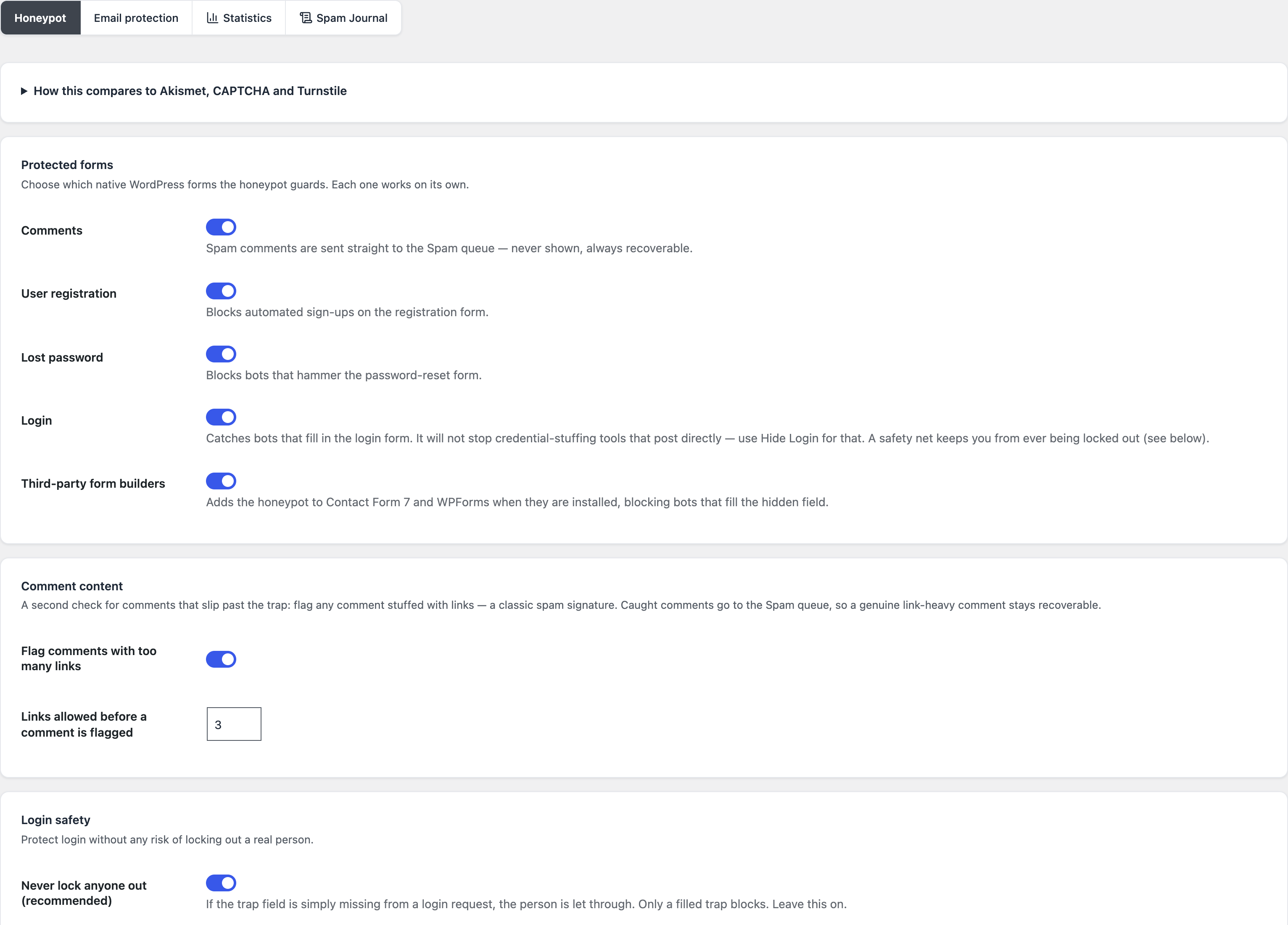
I enabled the module on a test site to take these screenshots: from installation to the log recording its first intercepted attempt, the whole journey takes less than two minutes, stopwatch in hand. The difference with a cloud anti-spam shows mostly in what isn’t there: no sign-up, no key, no quota.
A word about protecting the login form, because the choice is counter-intuitive: there, the module is deliberately “fail-open” — on an ambiguous signal, it lets the submission through. A spam comment that slips through gets deleted in one click; an administrator locked out is an evening lost. Anti-spam tools that lock down login aggressively generate more support tickets than they stop attacks.
What about the email addresses displayed on your site?
Spam doesn’t only come through forms: harvester bots crawl your pages to scoop up email addresses written in plain text, which end up in spam databases sold on. The module protects that surface too: an [email] shortcode and a Gutenberg block display the address encoded — unreadable to a harvester, perfectly clickable for a human.
It’s the natural companion to your Contact page: you display [email protected] for your readers, and the scripts raking through your HTML harvest nothing but encoded mush. An address that’s never harvested is an address that receives no spam — the best filter is still the one you never need.
The comparison in one table
| Criterion | CAPTCHA (reCAPTCHA, Turnstile) | Cloud anti-spam (Akismet, CleanTalk) | Blaminhor Essentials Anti-Spam module |
|---|---|---|---|
| Visitor friction | Grids, checkboxes, challenges | None | None |
| Data sent to a third party | Yes (before consent, for reCAPTCHA) | Yes (content + IP) | No — everything is local |
| Price | Free (with a quota) | Paid for commercial use | Free |
| Forms covered | Depends on integration | Mostly comments | Comments, login, registration, lost password, CF7, WPForms |
| Risk of blocking a human | Real (failed challenge) | False positives possible | Fail-open on login |
| IP storage | On the third party’s side | On the third party’s side | Never in plain text (salted SHA-256, transients) |
What limits should you know before choosing?
Three, and I’d rather write them down myself: human spam gets through, CGNAT makes IP blocking imprecise, and a honeypot is no substitute for brute-force protection on your login — that’s what the Login Security module (Beta) is for.
Spam posted by hand by operators paid per task gets past every automated trap — that’s true here as everywhere, human moderation required. IP blocking, temporary by design, can brush against users sharing a mobile carrier’s address; that’s precisely why it expires on its own and spares the login form. Finally, the honeypot filters spam bots; a brute-force attack targeting your passwords calls for a different defense — attempt limiting and two-factor authentication — which goes beyond what an anti-spam module is for. Since version 2.6.0, that defense lives in the same plugin: the Login Security module, still in Beta, throttles brute-force attempts on the login form, XML-RPC, the REST API and application passwords, and adds two-factor sign-in (authenticator app, passkey, emailed code or backup codes), all on your own server.
Spam you no longer see, visitors you no longer bother
The best WordPress anti spam plugin is the one neither your readers nor you ever notice: no image grid at the door, no overflowing “pending” folder, no invoice arriving the day the site turns professional. An invisible field, some common-sense checks, and your data staying home.
The Anti-Spam module is one of the free modules in Blaminhor Essentials, the modular plugin I’m building to replace the stack of single-purpose plugins — enable what serves you, ignore the rest. And if your first security reflex is the front door itself, start by understanding how logging in to WordPress works: you protect better what you understand.
FAQ
Is a honeypot really enough against spam in 2026?
Against automated bots — the overwhelming majority of spam — yes: they fill in the invisible field and give themselves away. Against human spam paid by the task, no, but no CAPTCHA survives that either. The right strategy is layered: an invisible trap, a check on submission timing, and temporary blocking of repeat offenders.
Why avoid reCAPTCHA on a European site?
reCAPTCHA sends browsing data to Google before any consent is given, which puts it in the GDPR red zone — France's data-protection authority (CNIL) requires prior consent for its invisible version. It also hurts conversion: every traffic-light grid drives away legitimate visitors. A local honeypot has neither of these two problems.
Is Akismet really paid for a professional site?
Yes. Akismet is free for strictly personal use; any commercial site must take out a paid subscription. And in both cases, every comment leaves your server with its author's IP address, bound for Automattic's servers for analysis — a personal-data transfer you have to document in your GDPR records.
Does the module also block spam on Contact Form 7 and WPForms?
Yes. The Anti-Spam module in Blaminhor Essentials injects its trap into Contact Form 7 and WPForms forms if those plugins are present, on top of WordPress's native forms: comments, login, registration, and lost password. A single setting protects every entry point at once.
What happens if the module gets it wrong about a human?
On the login form, nothing irreversible: the module is deliberately "fail-open" — when in doubt, it lets the submission through rather than locking a legitimate user out. That's a deliberate choice: a spam comment that slips through gets deleted in one click; a customer locked out at login turns into a furious support ticket.
Is IP blocking compatible with the GDPR?
In this module, the raw IP address is never stored: it is turned into a salted SHA-256 fingerprint — non-reversible — kept only in transients that expire on their own. You block repeat offenders without ever building a file of IP addresses — there is literally nothing to enter in your processing records.
Does a honeypot work with a caching plugin?
The one in Blaminhor Essentials does: the trap is designed to stay valid on a page served from cache, with no short-lived token that would expire. It's a point worth checking with any anti-spam tool — many token-based protections break silently the moment a page cache serves the same copy of the page to everyone.
Comments