
WordPress Cookie Consent Plugin: Free and Self-Hosted
A GDPR-ready cookie banner with no subscription and no third-party service: script blocking before consent, jurisdiction presets, a proof log — free.

The cookie banner has become the most hated tollbooth on the web — and yet, done badly, it protects no one: not your visitors, whose data leaks out before they’ve said yes, and not you, still exposed to regulators behind a purely decorative banner. The market’s answer was cloud services on subscription, billing you every month for the right to be compliant. I took the opposite road: a complete consent module, self-hosted, free — because compliance shouldn’t be a rent payment.
The essentials
- The European rule fits in one sentence: no non-essential cookie before freely given consent, and refusing must be as easy as accepting — France’s CNIL, one of the strictest enforcers, spells it out exactly that way.
- The module blocks scripts, inline scripts, and iframes (YouTube, maps…) until their category is accepted — the first thing any audit checks.
- 28 jurisdiction presets tune the banner to the applicable law: strict European opt-in, American opt-out with “Do Not Sell or Share,” Brazil’s LGPD…
- The consent log covers 13 months — the CNIL-recommended period — as anonymized fingerprints: proof without the personal-data file.
- 100% self-hosted and free: no subscription, no billed scans, no third-party server inside your consent loop.
What must a cookie banner do to be genuinely compliant?
Three things, in this order: prevent any non-essential cookie from being set before the visitor chooses, make refusal as accessible as acceptance, and keep proof of the consent collected. Everything else — colors, position, wording — is decoration around those three obligations.
The first one disqualifies most WordPress cookie consent plugins in the wild. A banner that displays while Google Analytics, the Meta pixel, or a YouTube video are already dropping their cookies is not a consent mechanism: it’s a decorative notification. France’s CNIL has stated it without ambiguity since its 2020 guidelines, and it’s the first point tested during an audit — just open your browser’s inspector on your homepage, Cookies tab, before clicking anything.
The second killed the single-button banner: if accepting takes one click, refusing must take one click. Flows where refusal has to be earned — “settings,” then uncheck, then confirm — are explicitly targeted by enforcement orders.
The third is the least known: if you’re audited, the burden is on you to demonstrate that consent was collected, when, and for what. Without a log, your compliance rests on your word.
Why a self-hosted banner rather than a cloud service?
Because your visitors’ consent has no reason to pass through a third-party server, and your compliance no reason to become a subscription: a self-hosted banner does the same job from your own site, with no rent and no dependency.
The market organized itself around SaaS solutions — Cookiebot, CookieYes, Usercentrics — whose model is to bill by traffic, pages scanned, or domain. That model has three consequences you discover after the fact: the price climbs with your audience, the banner stops working if the subscription does, and one more actor slips into your consent data pipeline — ironic, for a data-protection mechanism. Complianz and CookieYes, at a million installs each, show the scale of the demand; their serious features largely sit behind the paid tiers.
Self-hosting flips every term of that deal: the banner is served by your site, the log lives in your database, the cost is zero and will stay zero. The honest trade-off is that your server does the work — light work, but real: the module rewrites your pages to neutralize scripts before consent.
How does the module handle different laws — GDPR, CCPA, LGPD?
Through 28 jurisdiction presets: you pick the applicable law, and the banner adopts the matching consent model — strict European opt-in, American opt-out with a “Do Not Sell or Share” link, Canadian or Australian hybrids, Brazil’s LGPD, India’s DPDP… Each preset sets in one move the model (opt-in, opt-out, or plain notice), the pre-checked categories, the presence of a “Reject all” button, and the re-consent window (6, 12, or 24 months depending on the regime).
Two presets deserve a closer look. The French preset adds the one-click refusal the CNIL insists on. The US preset activates the “Do Not Sell or Share My Personal Information” link required by California law — a requirement with fresh teeth, since new CCPA regulations took effect in January 2026 and put opt-out mechanics under closer scrutiny. The module also honors the Global Privacy Control signal server-side: a visitor whose browser emits GPC gets non-essential cookies refused automatically, and the site confirms it with the Sec-GPC-Acknowledged header. Nearly every banner on the market handles GPC in JavaScript, when it handles it at all; server-side handling is more robust and easier to stand behind.
How do I install and configure it in practice?
Activate the Cookies module, pick your jurisdiction preset, declare your services, generate the policy page: four steps, no account to create.
- Install Blaminhor Essentials and activate the Cookies module.
- Select the preset matching your situation — for a site serving EU visitors: the European opt-in, one-click refusal included.
- Declare your services (Analytics, YouTube, pixels…) in their categories: this declaration drives both the pre-consent blocking and the cookie policy table.
- Click “Create policy page”: the module generates the page with the
[blaminhor_cookie_declaration]shortcode, which displays a declaration table grouped by category — and which updates itself whenever you add a service. That page nobody ever writes is nonetheless a legal requirement.
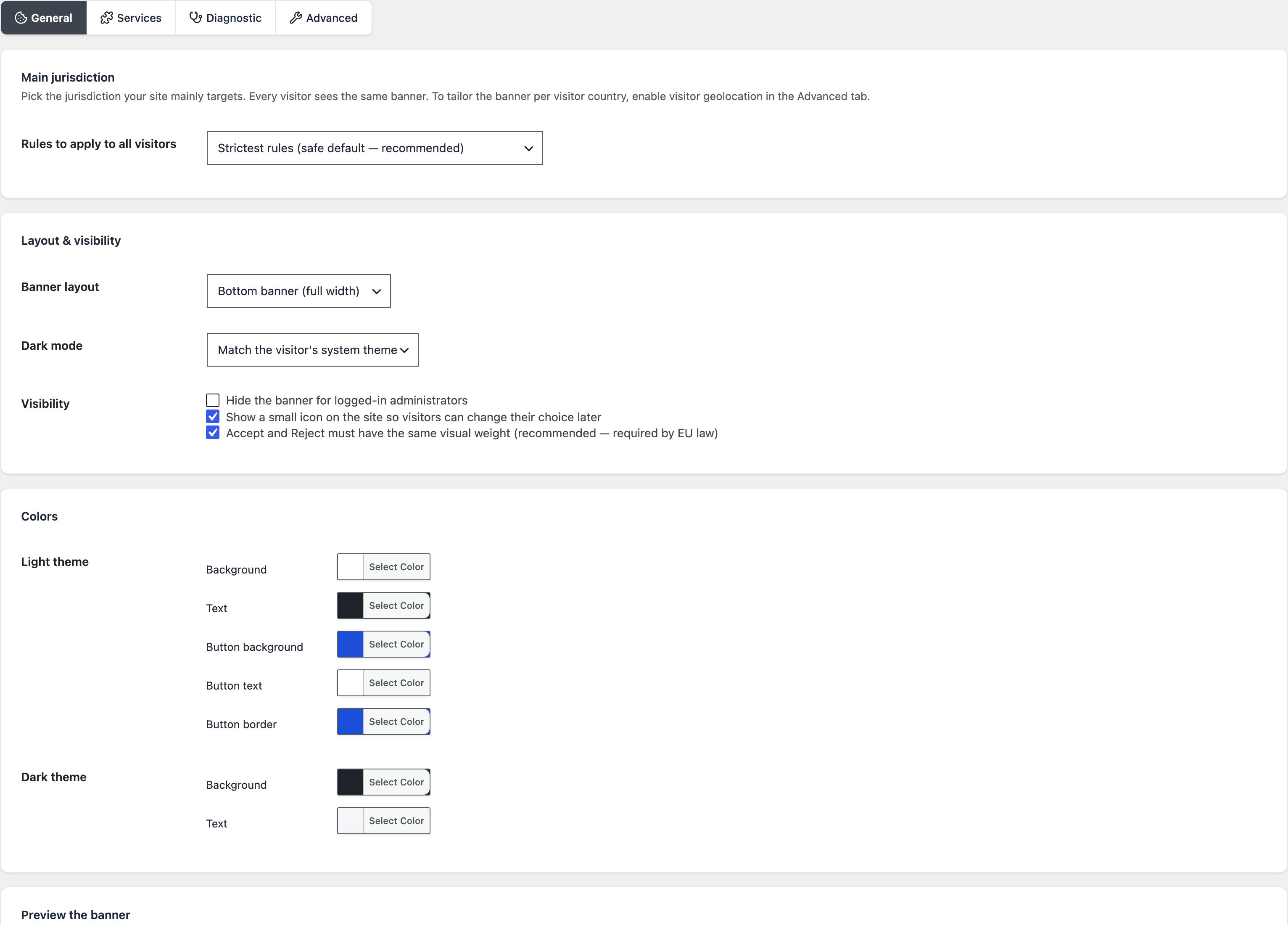
I ran this exact setup on a test site to take the screenshots for this article: from module activation to a working banner with its generated policy page, without leaving the WordPress admin once — precisely the level of simplicity I was aiming for when I built it. If you use a Google product, Consent Mode v2 is emitted natively: Analytics and Ads receive the consent state in the format they’ve expected since March 2024, no extra tag needed.
The comparison in one table
| Criterion | SaaS (Cookiebot, CookieYes…) | Complianz (freemium) | Blaminhor Essentials Cookies module |
|---|---|---|---|
| Where consent is hosted | The vendor’s servers | Your server | Your server |
| Price | Subscription, grows with traffic | Limited free tier, Premium per site | Free, no tiers |
| Blocking before consent | Yes | Yes | Yes, inline scripts and iframes included |
| Jurisdiction presets | Depends on plan | Yes | 28, from GDPR to India’s DPDP |
| Global Privacy Control | Rare, in JS | Partial | Honored server-side + confirmation header |
| Proof log | On the vendor’s side | Local | Local, 13 months, anonymized fingerprints |
| IAB TCF certification | Depends on plan | Add-on | No — by design, outside the ad-tech target |
What are the fines actually worth for a modest site?
The headline records — hundreds of millions against Google or Meta — are not your risk; your risk is a visitor’s complaint, free to file, that triggers an audit, a public compliance order, and the obligation to fix everything in a hurry. European authorities regularly publish sanctions and formal notices aimed at perfectly ordinary businesses — France’s CNIL is the most visible example — and California’s regulator now has its own enforcement track. The double penalty is mostly reputational: the order is public, and your duct-taped banner becomes a press release.
The good news is that the required level is entirely reachable: blocking before consent, one-click refusal, proof kept. Exactly what a well-designed WordPress cookie consent plugin automates.
Compliance is not a subscription
A cookie banner is no loss leader for a SaaS: it’s a stable legal obligation that resolves perfectly well with code running on your own server. Block before consenting, refuse as fast as accepting, prove without profiling — the Cookies module does that work for free, and your visitors share their choice with you and no one else.
It’s one of the modules of Blaminhor Essentials, the free and modular plugin — alongside the CAPTCHA-free anti-spam, which shares the same philosophy: your data stays home, and the invoice doesn’t exist.
FAQ
Is a cookie banner mandatory on every WordPress site?
As soon as the site sets non-essential cookies — analytics, advertising, embedded videos — before or without consent, yes: the GDPR and the ePrivacy Directive require it for any site within reach of European law, wherever it is hosted. A brochure site with no analytics and no third-party embeds can do without one; in practice, that's rare.
What does a site risk without compliant consent?
European regulators — France's CNIL among the strictest — have issued fines running to hundreds of millions of euros against the giants, but they also audit and formally order small businesses to comply. The most concrete risk for a small site remains a visitor's complaint — free to file — and the compliance order that follows, with the public exposure that comes with it.
Why avoid cloud solutions like Cookiebot or CookieYes?
They run on subscriptions, put their own servers inside your consent loop, and the bill climbs with your traffic or the number of pages scanned. A self-hosted banner does the same job from your own server: no monthly invoice, no dependency, and your visitors' consent passes through nobody else's hands.
Does the module really block scripts before consent?
Yes, including inline scripts and embed iframes (YouTube, maps): they are neutralized until the visitor accepts the matching category, then executed once consent is given. It's the first thing regulators check — a banner that displays while Google Analytics is already running protects nobody.
How do I prove consent if I get audited?
The module keeps a 13-month consent log — the validity period recommended by France's CNIL — as anonymized fingerprints: you can demonstrate that consent was collected without having built a personal-data file to prove it. The register is available right in the admin.
What is Google Consent Mode v2, and does it concern me?
It's the mechanism through which your banner reports consent status to Google Analytics and Google Ads, required since March 2024 to use advertising measurement in the European Economic Area. If you use a Google product, it concerns you; the module emits it natively, with no extra tag to add.
Does per-visitor geolocation work on its own?
No, and I'd rather say it plainly: adapting the banner to the visitor's country requires the MaxMind database, uploaded manually, or Cloudflare's geolocation headers if your site runs behind them. Without country resolution, the module applies the strictest preset — you are compliant by default, never the other way around.
Comments