
WordPress Redirection Plugin: Which One Should You Use?
Redirection, Simple 301 Redirects, .htaccess or an all-in-one? An honest comparison of how WordPress redirect plugins differ—and which one fits your site.

At some point every WordPress site needs a redirect: you rename a page, merge two articles, migrate a domain, and suddenly old addresses lead nowhere. The tool market for this is odd—one plugin has been the default answer for a decade, several alternatives do a tenth of the job, and your SEO plugin may already hide the feature in a tab you’ve never opened. Let me lay out the real differences, tell you honestly when my own plugin isn’t the right pick, and help you choose once instead of installing three.
The essentials
- Redirection (John Godley) is the reference: 2 million+ active installs, actively maintained, tested against current WordPress. Nothing here is about it being bad.
- Redirect rules live in the plugin’s own database tables, not in WordPress: switching tools without exporting means losing every rule.
- Never run two redirect engines at once—your SEO plugin’s redirect tab plus a dedicated plugin is a genuine source of unpredictable bugs.
- The feature that actually changes your workflow isn’t the redirect itself, it’s the 404 log: it tells you which dead URLs real visitors hit.
- Blaminhor Essentials supports 301, 302, 307, 410 and 451, plain and regex matching, CSV import, and one-click import from Redirection or Safe Redirect Manager.
What does a redirection plugin actually do that .htaccess doesn’t?
A redirect plugin stores your rules in the database and applies them from inside WordPress, which means anyone with admin access can add one from a form—no server file, no FTP, no deploy. The tradeoff is timing: the server file answers before WordPress even boots, while a plugin answers after.
That difference sounds damning and mostly isn’t. On a request that would have ended in a 404, WordPress was going to load anyway. You’re adding one indexed database lookup to a page that was already being generated. For a handful of permanent, never-changing rules—a domain move, a folder rename—.htaccess is genuinely faster and I’d use it. For everything that changes as the site lives, the plugin wins on the only axis that matters day to day: you’ll actually do it, instead of putting it off until you have SSH access.
There’s a second thing the server file can’t give you, and it’s the real reason to use a plugin: a log of the URLs people are failing to reach. Apache can redirect what you predicted. Only something running inside WordPress can tell you what you didn’t.
Which WordPress redirection plugin should you choose?
Four honest options, and the deciding factor is rarely the redirect itself—it’s what surrounds it.
| Option | Best when | The catch |
|---|---|---|
| Redirection (2M+ installs, maintained) | You want the reference tool, regex, conditional rules by login state or browser | Logs every hit by default—on a bot-heavy site the table grows fast and needs manual pruning |
| Simple 301 Redirects (100k+ installs) | You have ten static rules and want zero interface to learn | Simple means simple: no 404 log, limited pattern matching |
| Your SEO plugin’s redirect tab (Rank Math free, Yoast Premium) | You already run it and your needs are basic | Ties your redirects to your SEO plugin—switching SEO tools means migrating redirects too |
| Blaminhor Essentials — Redirections module | You want redirects, a 404 monitor and broken-link scanning without three plugins | It’s one module of a bigger plugin: pointless to install for redirects alone if you need nothing else |
Read that last row as written. If all you need is redirects and you’re happy with your current stack, Redirection is an excellent plugin and there is no reason to move. I build a modular plugin because most sites need eight small things, not one; the argument is about the total, not about beating a two-million-install tool at its own single feature.
What should you look for beyond « it redirects »?
Five things separate a redirect tool you’ll still trust in two years from one that quietly becomes a liability.
- Loop protection. Redirect A to B today, B to A in six months, and you’ve built
ERR_TOO_MANY_REDIRECTSfor yourself. The plugin should refuse or flag it at save time. - Log discipline. A 404 log is valuable until it’s 400,000 rows of bot noise in a table nobody backs up deliberately. Look for a cap and an automatic purge.
- A real exit door. CSV export isn’t a nice-to-have—your rules are hostage to whichever plugin holds them.
- Status codes beyond 301. A deleted-on-purpose page deserves a 410 Gone, which gets it de-indexed faster than a 404. Most lightweight plugins only do 301 and 302.
- Regex that fails safely. A regular expression that blows up at runtime shouldn’t take the site with it.
That last point is worth an example, because it’s the failure mode people don’t anticipate. A regex with catastrophic backtracking doesn’t return an error—it hangs the PHP process on every matching request. In Essentials, a rule whose pattern fails at runtime is automatically disabled and logged rather than retried on every visit. You lose one rule; you don’t lose the site.
How does the Blaminhor Essentials redirections module work?
It’s the redirect manager I wanted while maintaining other people’s sites: rules, a 404 monitor, and a way out—without a plugin dedicated to each.
- Enable the Redirections module (everything you don’t enable stays off and loads nothing).
- Add rules from the Add New tab: source, target, and a status code among 301, 302, 307, 410 and 451—the last two need no target, since the point is that nothing replaces the page.
- Toggle regex for pattern rules; plain rules are matched first, so your simple cases never wait behind a pattern.
- Turn on the 404 monitor to see which dead URLs visitors actually hit, with the referring site and a hit count—then convert any of them to a 301 in one click.
- Coming from another plugin? The Import tab detects an existing Redirection or Safe Redirect Manager install, counts the rules it found, and imports them—or takes a CSV.
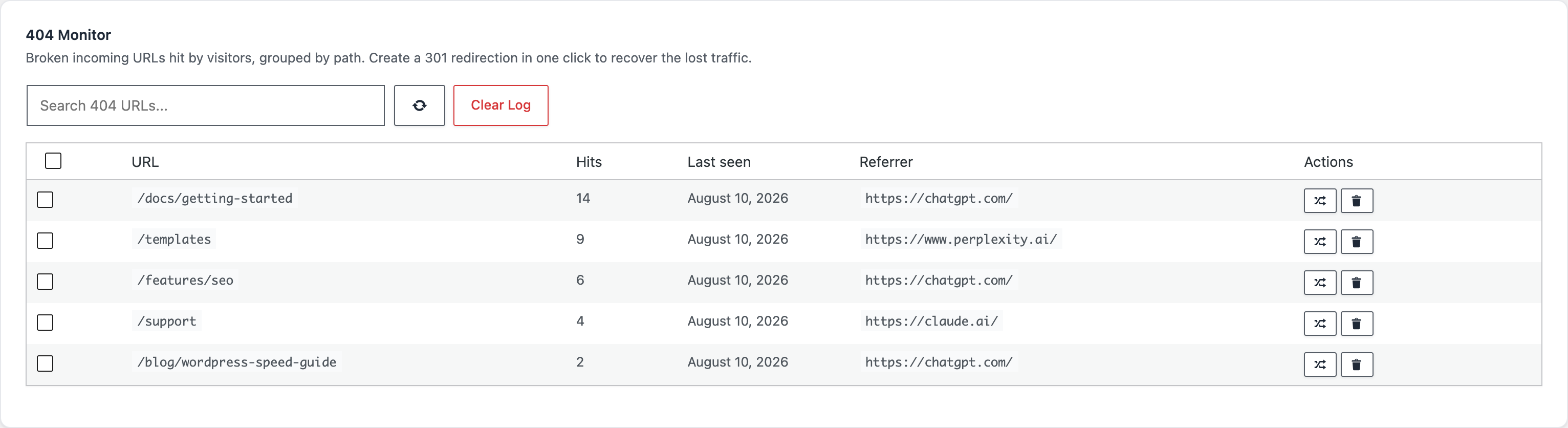
Every action has a WP-CLI mirror, which is what you want when the site is one of thirty you maintain:
wp blaminhor redirections add --source=/old-page/ --target=/new-page/ --status=301
wp blaminhor redirections list --format=csv
wp blaminhor redirections 404-list
The safeguards, stated plainly so you can check them against your own needs: loops are detected at save time (both A → A and the reverse B → A when A → B already exists) and disabled automatically with a banner; the 404 log stores paths without query strings, caps at 5,000 distinct URLs and purges on a retention window you set; and hit counts tell you which rules still earn their keep.
Should you migrate the redirects you already have?
Only if you’re consolidating plugins anyway. « It redirects » is not a reason to move—« I’m replacing four plugins with one » is.
If you do migrate, the order matters more than the tool:
- Export first, from the old plugin, and keep the CSV somewhere that isn’t the site.
- Import into the new one, then compare the rule counts—they should match exactly.
- Test a handful by hand with
curl -Ior your browser’s network tab: you want a301and the right destination, not a chain. - Only then deactivate the old plugin. Its rules die with it.
- Watch the 404 log for a week. Anything you missed shows up there, and you fix it in one click.
If you’re new to the mechanics of all this, my guide on setting up 301 redirects in WordPress covers the why before the which, and the one on 404 errors sent by AI assistants explains why dead URLs now arrive from ChatGPT as well as from Google.
Choose once, then forget about it
The best redirection plugin is the one whose rules you can still export in three years and whose 404 log you’ll actually read. Redirection does that and does it well. So does the Redirections module of Blaminhor Essentials, the free modular plugin I build—with the difference that it comes with twenty-plus other modules you can switch on when you need them, and that stay dormant when you don’t.
Whichever you pick: pick one, turn the others off, and keep the CSV.
FAQ
Do redirect plugins slow down WordPress?
A little, and it's usually invisible. Every redirect plugin adds one database lookup on requests that don't match a real page. The cost shows up when a plugin logs every hit and the log grows to hundreds of thousands of rows. Pick one that caps or purges its logs, and the overhead stays negligible.
Should I redirect with a plugin or with .htaccess?
Use .htaccess when you have a handful of stable rules and comfortable server access—it's the fastest, since Apache answers before WordPress loads. Use a plugin when rules change often, when several people manage the site, or when you want a 404 log. Most sites are the second case.
What happens to my redirects if I switch plugins?
They stop working the moment you deactivate the old plugin—the rules live in its own database tables, not in WordPress core. Always export to CSV first, or use an importer. Blaminhor Essentials detects an existing Redirection or Safe Redirect Manager install and imports the rules directly.
Can a redirect plugin create an infinite loop?
Yes, and it's the classic self-inflicted outage: you redirect A to B, then later B back to A, and the browser gives up with ERR_TOO_MANY_REDIRECTS. Good plugins detect it before saving. Essentials checks for direct loops (source equals target) and reverse loops, flags them, and disables them automatically.
How many redirects is too many?
There's no hard limit—sites run thousands without trouble, because the lookup is indexed. What actually hurts is chains: A goes to B goes to C. Each hop costs the visitor a round trip and dilutes link signals. Keep chains at one hop by pointing old URLs straight at the final destination.
Do I need a redirect plugin if my SEO plugin already does redirects?
No, and running both is a bad idea—two plugins racing to answer the same request produce unpredictable results. Rank Math and Yoast Premium include redirect managers. Pick one tool and disable the others' redirect features. Duplicating this is a real source of hard-to-debug bugs.
Which status code should I use: 301, 302, 307 or 410?
301 for a permanent move—it passes link signals and is what you want most of the time. 302 and 307 for a temporary detour you'll undo. 410 for content deliberately deleted forever, which tells crawlers to stop asking faster than a 404. Essentials supports all of these plus 451.
Comments