
MojiWall: Learn Japanese Kana and Kanji via Wallpapers
MojiWall is a free, ad-free tool that turns your phone and desktop wallpaper into passive Japanese practice—generate kana and kanji images across all JLPT levels.
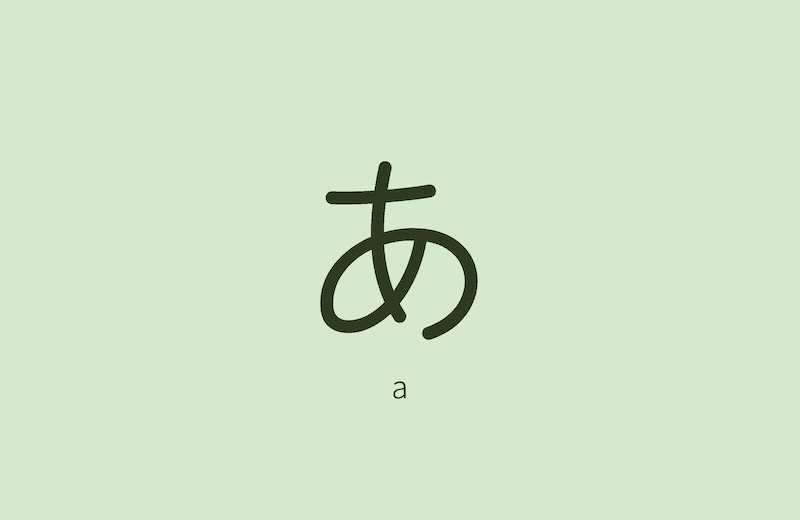
If you’re learning Japanese—or grinding through JLPT kanji—you already know the real enemy isn’t difficulty, it’s exposure. You can drill flashcards all evening, but the characters you don’t see are the characters you forget. So I built MojiWall: a free tool that turns the screen you glance at two hundred times a day into passive revision. This is what it does and why it works.
👉 Try MojiWall — free Japanese character wallpapers
The essentials
- Free and ad-free—a passion project, not a product with a paywall.
- Covers hiragana, katakana and all JLPT kanji (N5 to N1)—close to 8,000 characters in total.
- Each character is shown with its romaji reading, on a clean single-character “zen” background.
- Choose a pastel colour or hit Random Colors, then download one character or a full set as a ZIP.
- Runs 100% in your browser, available in English and French.
What is MojiWall, exactly?
MojiWall is a smart wallpaper generator built specifically for learning Japanese. The idea is simple: the screen you unlock all day is the best revision tool you’re not using. Instead of a photo you stopped noticing months ago, you set a character you’re trying to learn—and you meet it, quietly, dozens of times a day.
It generates minimalist, deliberately calm images: one character, one soft colour, drawn from gentle pastel palettes. No clutter, no busy backgrounds—just visual isolation so the shape actually lands. Whether you’re starting with hiragana or suffering through N1 kanji, MojiWall builds the images to match where you are.
Which characters and levels does it cover?
Everything a learner needs, from day one to fluency:
- Hiragana and katakana—the full syllabaries.
- Kanji for every JLPT level, N5 right through N1.
Altogether that’s close to 8,000 characters. You filter by type and by level, so a beginner sees only their kana and an N1 candidate sees only the kanji they’re still fighting. Each one displays with its romaji reading, so a wallpaper isn’t just a shape to stare at—it’s a shape and how to say it.
| Character type | Coverage | Shown with |
|---|---|---|
| Hiragana | The full syllabary | Romaji reading |
| Katakana | The full syllabary | Romaji reading |
| Kanji | Every JLPT level, N5 → N1 | Romaji reading |
How do you use it?
You open MojiWall, filter to the character type or JLPT level you’re working on, pick a background colour, then download a single character or a whole set as a ZIP—and set it as your device wallpaper on shuffle. The whole flow takes under a minute and needs no account.
- Open MojiWall.
- Pick your character type or JLPT level (e.g. Hiragana, or Kanji N4).
- Choose a background colour, or hit Random Colors for a fresh pastel.
- Download a single character, or grab a whole set as a ZIP.
- Set your phone, tablet or computer to cycle through them in slideshow mode.
Every time you wake your screen, you review a character. That’s the whole trick—and it costs you no extra study time.
Why I built it (and why it’s free)
I made MojiWall because I wanted it myself, and because the best learning tools are the ones that disappear into your day. It’s free and ad-free on purpose: no flashing banners, no account, no “premium N1 pack.” Just characters and colours. It runs entirely in your browser—your downloads are generated on your own device—and it’s available in English and French.
If it helps you burn a few more kanji into memory between study sessions, it’s done its job. I’d genuinely love your feedback if you have ideas to make it better.
👉 Try MojiWall — free Japanese character wallpapers
– blaminhor
FAQ
Is MojiWall free?
Yes, completely free and ad-free. It's a passion project, not a business—no banners, no sign-up, no paywalled levels. You generate and download the wallpapers you want, whether that's a single character or a whole set, at no cost.
How do I set a rotating or slideshow wallpaper on iPhone or Android?
MojiWall makes the images; your phone handles the rotation. Download a set as a ZIP, drop it into an album, and point your device's shuffle feature at it—iOS Photos shuffle or a wallpaper widget, and on Android a wallpaper-changer app. You'll then cycle through a fresh character on every unlock.
Does MojiWall show kanji meanings and stroke order, or only the character?
Only the character and its romaji reading—MojiWall is deliberately minimal, built for passive exposure rather than full study. It doesn't show meanings, stroke order or example words. Pair it with a dedicated app or textbook for those; MojiWall's job is to keep the shapes in front of your eyes between sessions.
Is MojiWall good for JLPT exam prep?
As a supplement, yes. You can filter kanji by JLPT level (N5 to N1) and keep the set you're studying on your screen all day, which helps recognition. It won't teach readings, meanings or grammar, so treat it as passive reinforcement alongside real prep—Anki, mock tests and textbooks.
Do I need an account or an app to use MojiWall?
Neither. MojiWall runs entirely in your browser—no account, no sign-up, no app to install. You open the site, filter the characters you want, pick a colour and download them as images. There's nothing to log into and nothing tracking you; it's just a page that generates wallpapers.
Comments