
What Is llms.txt, and How to Add It in WordPress
llms.txt is a plain-Markdown map of your site for AI assistants. Here's what it really does in 2026, what it doesn't, and how to publish one in WordPress in one click.

Every few months a new file promises to make your site “AI-ready.” Most are noise. llms.txt is worth understanding anyway—not because it’s magic, but because it’s cheap, honest, and points at where the web is heading. I added one to my own sites the week the idea landed, watched what actually fetched it, and I’ll tell you plainly what it did and didn’t do. Then I’ll show you the one-click way to publish yours in WordPress.
The essentials
- llms.txt is a community proposal (Answer.AI, September 2024)—not a W3C or IETF standard. No AI company is obliged to honor it.
- It’s a Markdown file at
yoursite.com/llms.txt: a site title, a one-line summary, then a curated list of your key pages with short descriptions. - Adoption sits around 5–15% of technical and documentation sites in 2026, and roughly 97% of published llms.txt files receive zero AI requests—so treat it as forward-looking, not a traffic lever.
- The clearest users today are coding assistants (Cursor, Continue, Cline) and agent tooling; Anthropic confirmed support and Perplexity retrieves it, while OpenAI and Google still point to robots.txt.
- In Blaminhor Essentials it’s generated live from your content, cached 12 hours, served as noindex plain text, and lists up to 100 recent entries per content type, excluding anything you marked noindex.
What is llms.txt, exactly?
llms.txt is a curated, Markdown-formatted file that tells a language model what your site is about and which pages matter most. Think of it as a friendly welcome desk for machines: instead of making an AI crawl and guess, you hand it a one-page brief—your site’s name, a sentence of context, and a tidy list of links with short descriptions.
The format is deliberately simple. A top-level heading with your site name, an optional blockquote summarizing what you do, then sections (one per content type) listing pages as Markdown links, each with a short note. That’s it. A human can read it in ten seconds; so can a model, and far more cheaply than parsing your whole site.
The idea comes from Jeremy Howard, co-founder of Answer.AI, who published the proposal in September 2024. His reasoning was practical: an LLM’s context window is small and expensive, and raw HTML pages are full of navigation, scripts and boilerplate that waste it. A clean Markdown map lets a model spend its attention on your actual substance.
Is llms.txt the same as robots.txt or a sitemap?
No—the three do different jobs, and llms.txt is the only one that’s about invitation rather than inventory or permission. They live side by side, and a well-run site can have all three.
Here’s the honest split. robots.txt is a bouncer: it says which crawlers may enter and which corridors are off-limits. sitemap.xml is a phone book: every URL you have, listed exhaustively for machines, with no editorial judgment. llms.txt is a concierge: a short, hand-picked “here’s what’s worth your time” written for a reader who thinks in language, not in XML.
| File | Purpose | Audience | Curated? |
|---|---|---|---|
| robots.txt | Permissions—who may crawl what | All crawlers | No (rules only) |
| sitemap.xml | Exhaustive list of every URL | Search engine crawlers | No (everything) |
| llms.txt | A readable map of your best content | AI assistants, agents | Yes |
That “curated” column is the whole point. Your sitemap might hold 4,000 URLs; your llms.txt should hold the twenty pages you’d actually want an assistant to quote.
Does ChatGPT actually read llms.txt in 2026?
Honestly? Mostly not—at least not for search visibility, and I’d rather tell you that than sell you a myth. As of 2026, no major AI provider has committed to using llms.txt in production search. OpenAI and Google both recommend robots.txt for crawler control, and Google clarified in June 2026 that llms.txt is not required for Search.
The measured reality is sobering. In one 90-day study, llms.txt files drew about 0.1% of all AI crawler traffic; another found roughly 97% of published llms.txt files got zero AI requests at all. If someone promises you rankings from an llms.txt file, they’re ahead of the evidence.
So who does use it? Two groups. First, coding and agent tools—Cursor, Continue, Cline and various MCP integrations read llms.txt to understand a project or a docs site. Second, a couple of answer engines are warming up: Anthropic has publicly confirmed support, and Perplexity says it retrieves llms.txt to help prioritize which pages to look at.
How do you add llms.txt to WordPress?
In WordPress you don’t hand-write or upload an llms.txt—you let the SEO module generate one from your live content and serve it at the root. With Blaminhor Essentials installed, it’s a single toggle plus two choices. Step by step:
- Activate the SEO module and open its GEO / AEO tab—the same tab that handles AI-crawler control (structured data has its own Schema tab).
- Tick “Enable llms.txt.” The moment you save, the file is live at
https://yoursite.com/llms.txt; the settings screen shows the link so you can open it in a new tab and check. - Pick your content types. Choose which post types belong in the map—typically posts and pages, plus products or a portfolio if they’re your substance. Each type becomes its own section.
- Write a Site Summary. One or two sentences describing what your site is about. This becomes the blockquote at the top—the first thing a model reads. Leave it blank and your site tagline is used instead.
There’s no physical file to maintain. A rewrite rule answers /llms.txt on the fly, so the map is always current: publish a post and it appears, unpublish it and it’s gone. Anything you’ve flagged noindex is left out, exactly as it is from your sitemap, so the two surfaces never contradict each other.
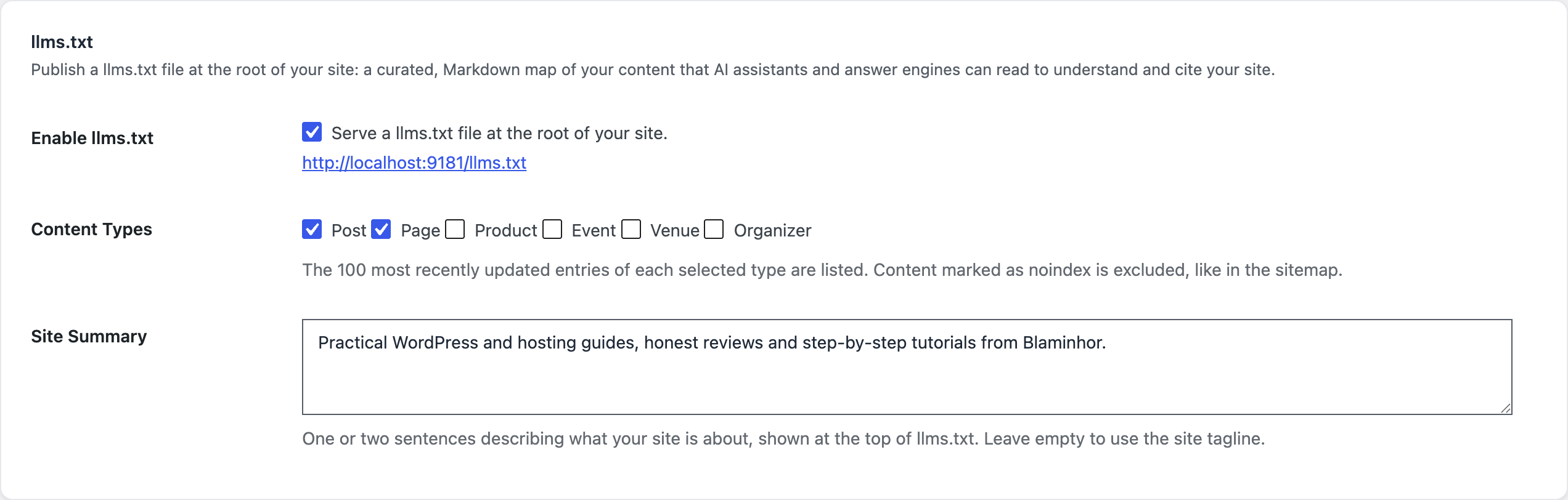 One toggle publishes a live llms.txt; you choose the content types and write a one-line site summary.
What does a good llms.txt contain?
A good llms.txt is short, curated and self-explanatory—your site’s name, one line of context, and your genuinely useful pages, each with a sentence that stands on its own. The generator follows the spec: an H1 with your site name, a blockquote summary, then ## sections per content type listing up to the 100 most recently updated entries, each as a link with a trimmed 25-word description drawn from your excerpt or content.
It also appends an Optional section linking to your XML sitemap—the spec’s way of saying “here’s the exhaustive index if you want more.” The result reads like a table of contents a thoughtful editor wrote, not a database dump. If you only remember one rule: llms.txt is where you’re selective. Your sitemap is where you’re complete.
Here’s what I saw after publishing mine
I turned it on across a handful of sites and then did the boring, honest thing: I watched the logs. For weeks, the file sat almost untouched—the adoption numbers above aren’t abstract, they matched what I saw. The requests that did come were mostly from agent tooling and the occasional Perplexity fetch, not a flood of ChatGPT traffic.
Did I turn it off? No. Publishing it cost me one click and zero maintenance, the file stays perfectly in sync with what I write, and the day an assistant does lean on it, I’m already there instead of scrambling. That’s the right frame for llms.txt in 2026: a cheap bet on where the web is going, made honestly, not a shortcut anyone can sell you.
Should you bother, then?
If it’s one toggle and it stays in sync by itself—yes. You lose nothing and you’re ready for adoption that’s clearly rising even if it’s still small. Just pair it with intent: if you want AI engines to cite you, keep their crawlers allowed, because a bot you’ve blocked in robots.txt can’t read your invitation either. That trade-off is exactly what the companion guide on blocking AI crawlers in WordPress is about.
llms.txt is one of the 20+ tools in Blaminhor Essentials—free and open-source on WordPress.org, built for people who want AI-era SEO without a heavy plugin.
FAQ
Is llms.txt an official standard?
No. llms.txt is a community proposal introduced by Jeremy Howard of Answer.AI in September 2024, not a standard ratified by the W3C or IETF. That means no AI company is obliged to read it. Some choose to; most treat it as optional. Adopting it is low-cost and forward-looking, not a guaranteed ranking lever.
Do ChatGPT and Google actually read llms.txt?
Mostly not yet, for search. As of 2026 OpenAI and Google point site owners to robots.txt instead, and Google stated in June 2026 that llms.txt is not required for Search. Anthropic has confirmed support and Perplexity retrieves it to help pick pages. The clearest users today are coding assistants like Cursor and Continue.
What's the difference between llms.txt, robots.txt and sitemap.xml?
robots.txt sets permissions (who may crawl what). sitemap.xml is an exhaustive machine list of every URL. llms.txt is neither: it's a short, curated, human-readable Markdown map that tells an AI what your site is about and points to your best pages. They complement each other rather than replace one another.
Where should the llms.txt file live?
At the root of your domain, reachable at https://yoursite.com/llms.txt, exactly like robots.txt. In Blaminhor Essentials it's served there automatically by a rewrite rule—there's no physical file to upload or keep in sync, and it's regenerated from your live content.
Will llms.txt slow my site down or get indexed by Google?
No. It's cached for twelve hours and served as lightweight plain text, deliberately outside the page cache so its formatting stays intact. It's sent with a noindex header so it won't show up as a page in Google's results—it's meant for machines reading your content, not for human search.
Should I add llms.txt if I'm also blocking AI crawlers?
Be consistent. A bot you block in robots.txt can't fetch your llms.txt either, so blocking ChatGPT while publishing a map for it cancels out. Decide per engine: if you want an AI to cite you, let its crawler in and give it an llms.txt; if you want it out, block it and skip the invitation.
Comments