
The Events Calendar Pro Alternative: Free in 2026
The Events Calendar Pro vanished into Liquid Web's consolidation and entry pricing now starts at $259/year. The Calendar module in Blaminhor Essentials does the job — for free.

If you’re searching for a The Events Calendar Pro alternative right now, you’re in good company. In spring 2026, the StellarWP brand was dissolved, theeventscalendar.com simply disappeared — it now redirects to Liquid Web — and the Pro plugin that hundreds of thousands of sites relied on got absorbed into bundles priced at $259, $399 or $599 per year. I built a full calendar module inside Blaminhor Essentials, my free and open source plugin — and it lands exactly when a lot of sites have to choose between paying much more or moving out. Here’s what happened, what the alternatives are worth, and what the Calendar module can do (screenshots included).
The essentials
- The Events Calendar Pro is no longer sold as a standalone plugin: since May 2026, its features live in Liquid Web bundles at $259/year (Essentials), $399/year (Pro) and $599/year (Elite); theeventscalendar.com redirects to liquidweb.com (checked July 7, 2026).
- The free version of The Events Calendar is still maintained on WordPress.org (700,000+ active installs, author now “Nexcess”) — but recurring events remain a paid feature.
- The Calendar module in Blaminhor Essentials is 100% free: recurrence, Stripe tickets, RSVP, appointments, rentals — with no premium tier.
- It includes a The Events Calendar importer (events, venues, organizers — de-duplicated and safely re-runnable) plus iCal import/export compatible with Google Calendar and Apple Calendar.
- It also covers what Amelia or Bookly charge $49–249/year for: appointment booking with time slots, reminders, Jitsi video calls and online payment.
What actually happened to The Events Calendar Pro?
The plugin wasn’t abandoned — its business model was dismantled. In May 2026, Liquid Web (already the owner through StellarWP) dissolved the StellarWP brand and consolidated its portfolio around four products. In the process, “Events Calendar Pro” stopped existing as a plugin you buy: it became the name of a pricing tier inside a bundled offer.
For users, three things changed. The official site theeventscalendar.com is gone — every page redirects to liquidweb.com. The entry price jumped: where the standalone Pro sold for around $149 and then $199 a year, you now need a $259/year Essentials bundle to get recurring events back — and $399/year for the real equivalent of the old Pro. And crucially, as WPBeginner reported, an existing subscription that lapses cannot be reactivated at the legacy price: you buy back in at the current rate.
The transition wasn’t smooth either: Search Engine Journal documented the backlash in user groups — lifetime licenses missing from the new portal, login problems, missing invoices. A lot of site owners woke up to a plugin whose vendor, website, license portal and price had all changed at once. Which is precisely the moment you ask yourself whether you’re still in the right place.
How much does a WordPress calendar plugin cost in 2026?
Anywhere from $0 to $599 per year depending on the tool and tier — and the price gap doesn’t always reflect a feature gap. Here’s the market as I recorded it on the vendors’ official pricing pages on July 7, 2026, for a single-site license:
| Plugin | Price (1 site) | Free recurrence? | Appointments / booking |
|---|---|---|---|
| The Events Calendar (Liquid Web) | Free, then $259–599/yr | No (paid) | No |
| Modern Events Calendar | $99/yr | Yes (Lite)* | Paid |
| EventON | $50 once + yearly addons | Very limited Lite | Via addons |
| Events Manager | Free, Pro $99/yr | Yes | Sign-ups yes, payments paid |
| Sugar Calendar | $49.50–199.50/yr (promo) | No (paid) | No |
| Amelia (booking) | $49–149/yr (promo) | — | Yes, core product |
| Bookly (booking) | $49–249/yr | — | Yes, core product |
| Simply Schedule Appointments | $99–399/yr | — | Yes, core product |
| Blaminhor Essentials – Calendar | $0 | Yes | Yes, included (Stripe, reminders, video) |
* Careful: Modern Events Calendar Lite is no longer distributed on WordPress.org (checked July 7, 2026) — you have to get it from the vendor’s site, which breaks automatic updates through the official channel.
Two takeaways. First, the market split into two families: event calendars (TEC, Sugar Calendar, Events Manager) and appointment tools (Amelia, Bookly, SSA) — if you need both, you pay twice. Second, the single most requested feature — recurring events — is still the vendors’ favorite tollbooth: free in Events Manager, paid in TEC and Sugar Calendar. Let me be honest for a second: Events Manager is a perfectly respectable free alternative if all you need is a calendar. Where the Blaminhor Essentials Calendar module stands out is that it covers both families at once, for free, inside a plugin that already handles SMTP, backups and SEO.
What can the Calendar module in Blaminhor Essentials do?
Everything you’d expect from a modern events calendar: one-off or recurring events, four public views, mapped venues, organizers, tickets and sign-ups. Let’s unpack it!
Every event carries its dates (with its own timezone and an all-day mode), a venue, one or more organizers, categories and tags, a cost and a ticket link. Recurrence is included for free: daily, weekly (with day picks), monthly or yearly, ending on a date or after a count — the same RRULE standard Google Calendar and Apple Calendar speak. And so large recurring series never slow your site down, occurrences are pre-computed into a dedicated table: rendering a month never recalculates recurrence on the fly.
For visitors, the calendar renders through a shortcode ([blaminhor_events]), a Gutenberg block or its automatic public page, in month, week, day or list view — and navigation works even without JavaScript:
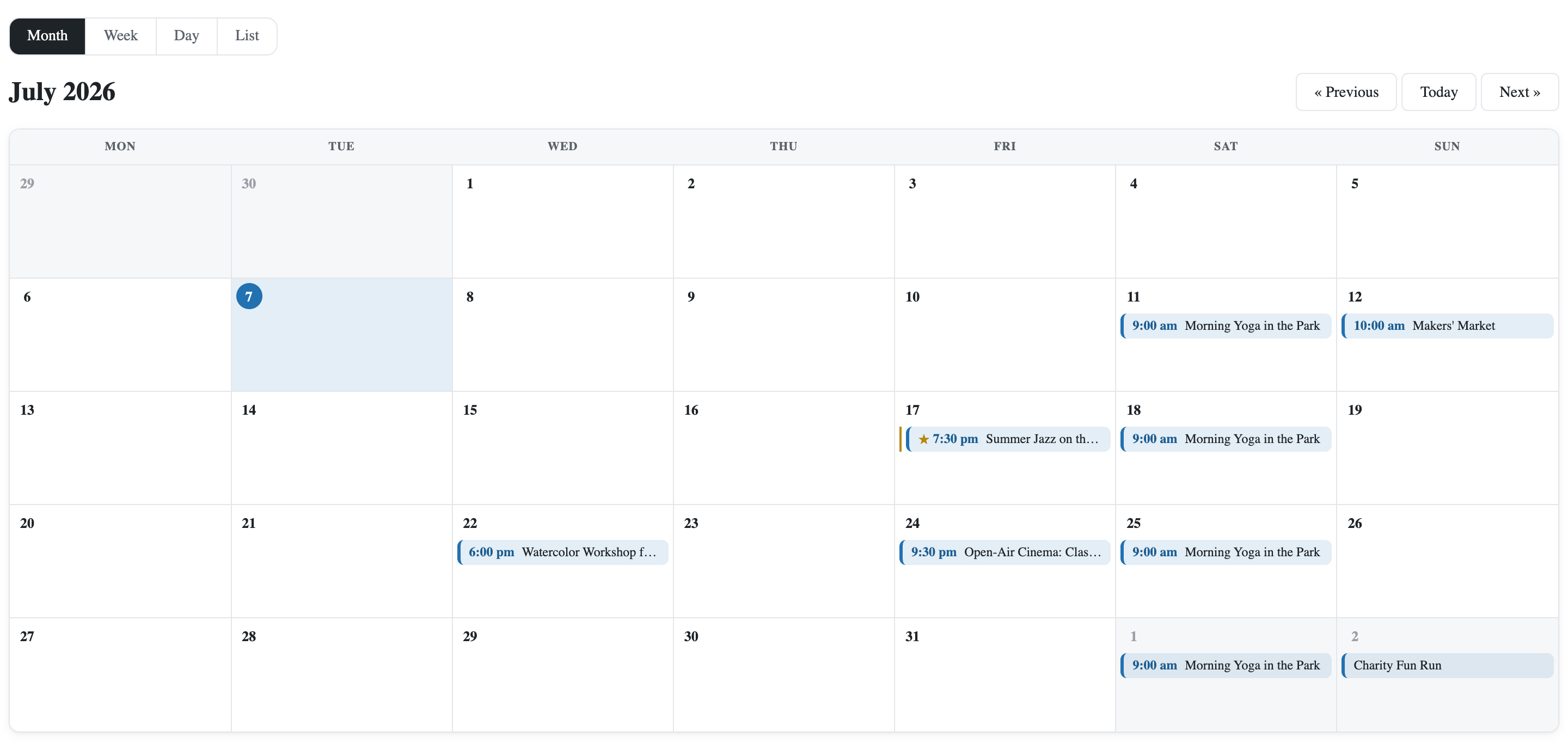 The public calendar in month view. The weekly yoga class repeats on its own — that’s one recurring event, not four copies.
Each event page shows an OpenStreetMap map with no API key whatsoever (where TEC’s map views required a Google Maps key), an Add to calendar (.ics) file, and the sign-up form when RSVP is on — with a seat counter, waitlist and manual approval if you want them:
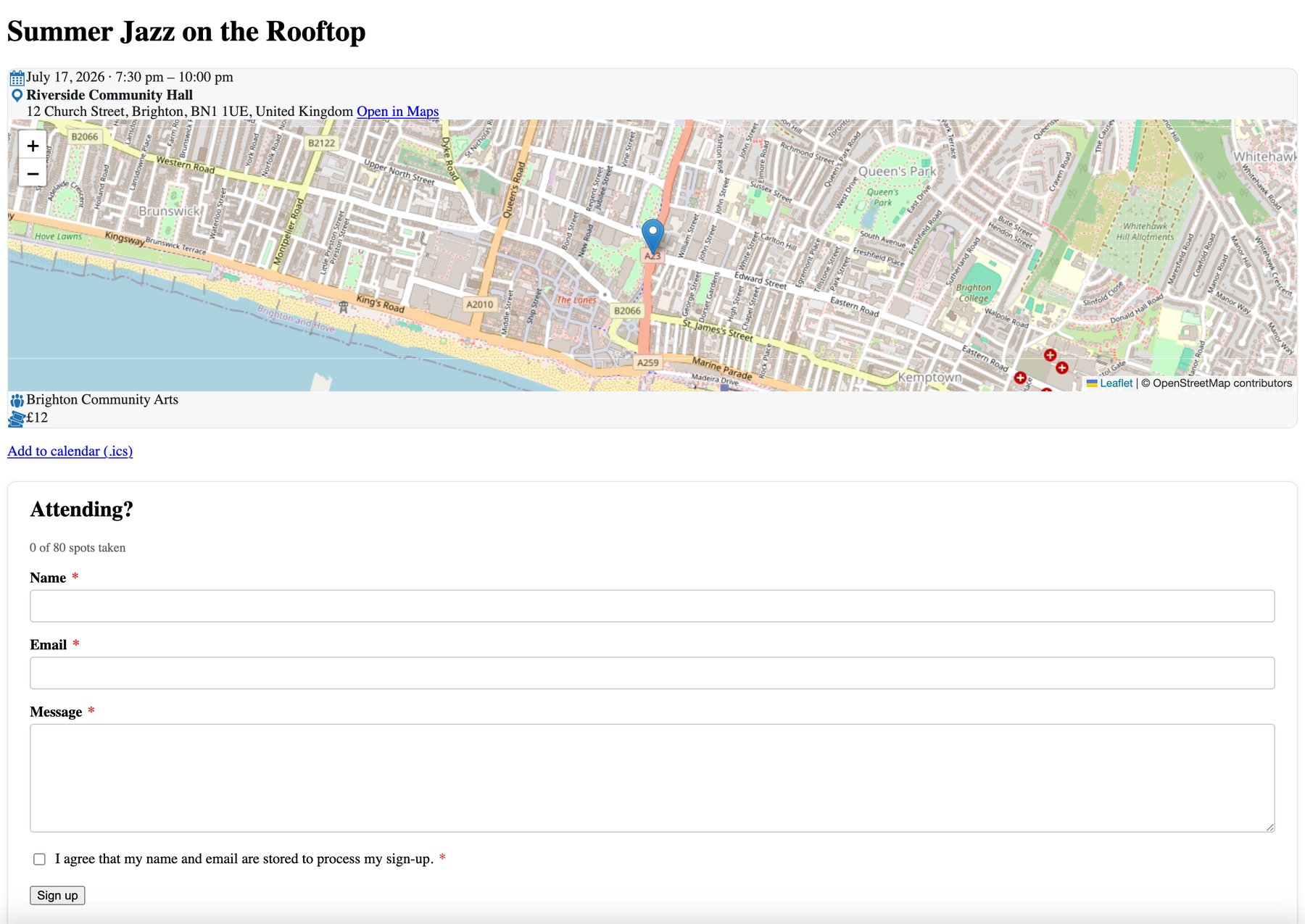 An event page: map without an API key, sign-up with a quota (“0 of 80 spots taken”) and a consent checkbox — GDPR isn’t an afterthought.
On the ticketing side, each event can sell several ticket tiers (regular, reduced, supporter… each with its own price and quota), charged through Stripe, with promo codes as a percentage or fixed amount. And for search engines, every event page automatically outputs its schema.org Event JSON-LD markup — dates, venue, organizer, offers — which Google requires for rich event results.
How do I migrate from The Events Calendar without losing anything?
With the built-in migration tool: it reads The Events Calendar’s data straight from your database and recreates it in one click — events, venues and organizers included. No file exports, no middleman plugin.
That mattered to me, because a failed migration is the best reason to stay locked into a tool. So the migrator works cautiously: it offers a preview first (how many events would be imported, without writing anything), it works even if The Events Calendar is already deactivated (as long as its data is still in the database), and every imported item remembers its original — running the migration again never creates duplicates. Titles, content, dates, timezones, featured images, categories, costs, venue addresses, organizer contacts: everything follows.
One limit, clearly stated in the tool: the old Pro’s advanced recurring schedules are not migrated (TEC stores them in a separate format) — the base event is imported, and you rebuild its recurrence rule in two clicks in the editor. For everything else there’s also iCal import: a .ics file or a feed URL, refreshed daily — handy for pulling in an existing Google Calendar.
Does it also replace Modern Events Calendar, EventON or Amelia?
In most cases, yes — the module covers both the free and the paid scope of these tools, and the universal doorway is called iCal. Because while The Events Calendar makes the headlines, the reasons to look for an alternative apply to the whole premium ecosystem.
Modern Events Calendar has its own trust problem: its Lite version is no longer distributed on WordPress.org (checked July 2026) — you must fetch it from the vendor’s site, so no more automatic updates through the official channel. EventON advertises $50 for life, but the substance lives in yearly-subscription addons that stack up fast (ticketing alone is $120/year). Sugar Calendar keeps recurrence behind the paywall. And on the booking side, Amelia, Bookly or Simply Schedule Appointments charge $49 to $399 a year for what a freelancer actually needs: services, time slots, reminders and online payment — exactly the module’s scope.
To migrate from these tools there’s no dedicated importer like for TEC, but there’s a standard route: they all export events as .ics, and the Calendar module imports an iCal file or feed while keeping dates, standard recurrences and descriptions. Full transparency on the limit: booking and appointment history doesn’t migrate automatically from any of these plugins — you restart with your availability and services reconfigured (an hour of work, not a week), and your old records stay readable in the old tool during the transition.
What if you need more than an events calendar?
This is where the module goes beyond The Events Calendar’s historical scope: it also includes appointment booking and resource rentals — what people usually pay Amelia, Bookly or an external Calendly for. I wrote a complete walkthrough of free WordPress appointment booking if that’s your main need; here’s the short version.
You define your services (duration, capacity, optional price, location — office, home visits or online), your weekly opening hours (with multi-week cycles, days off and holidays), and the public widget computes free slots:
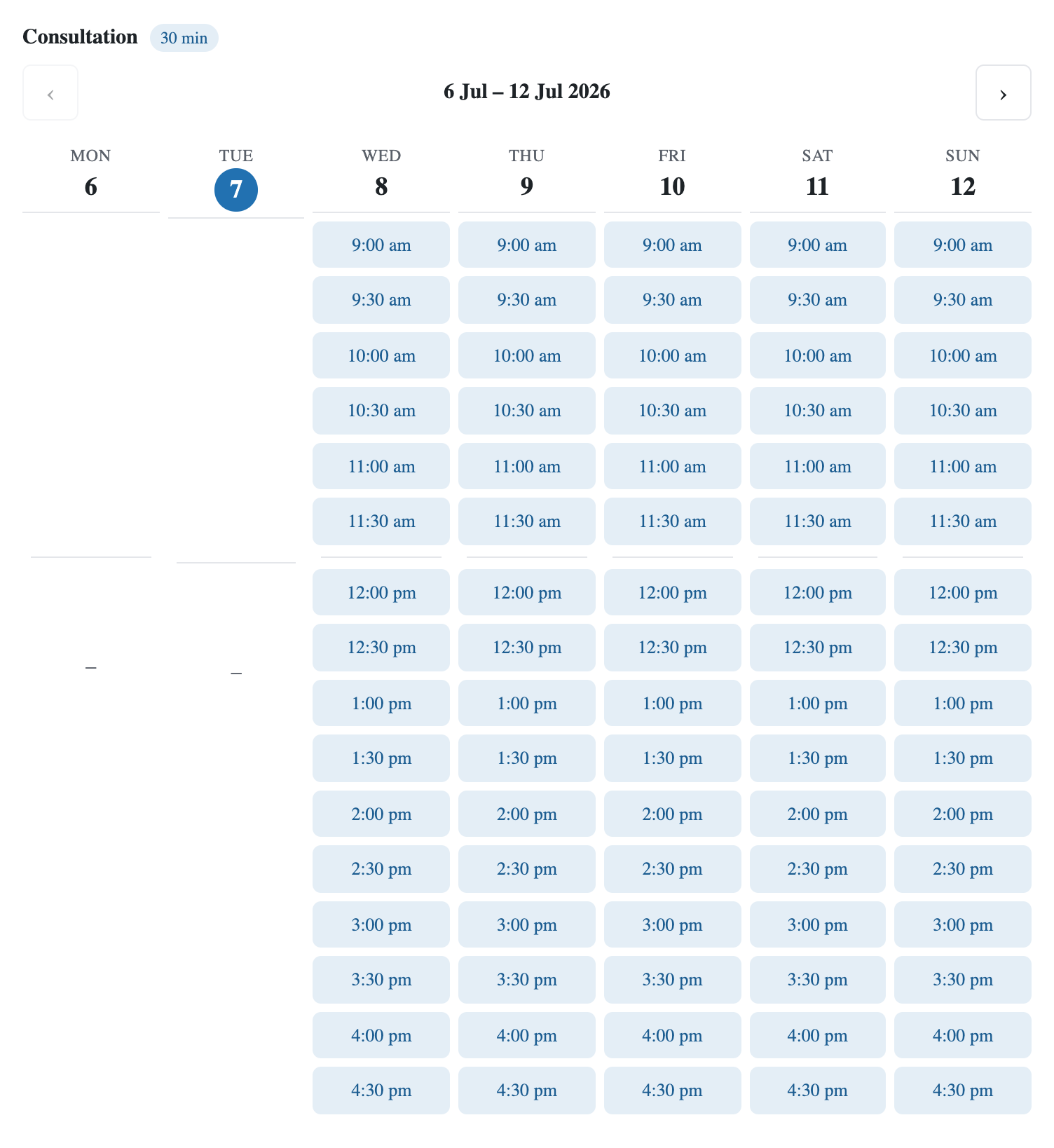 The booking widget (
[blaminhor_booking]): the visitor picks a slot, types a name and an email — done.
A few details that matter daily: visitors never create an account — they manage, reschedule or cancel through a secure email link; online appointments can auto-generate a Jitsi video room (free, no account, no API); a client can book a recurring series (the same slot every week) in one go; and automatic reminders go out before each appointment — provided your WordPress emails actually deliver, which the SMTP module in the same plugin exists to guarantee.
The third string on the bow is rentals: resources with stock (bikes, rooms, gear), booked over a date range, with approval, waitlist and Stripe payment. Three jobs — events, appointments, rentals — the module calls “natures”: you only switch on the ones you need, and the others appear nowhere.
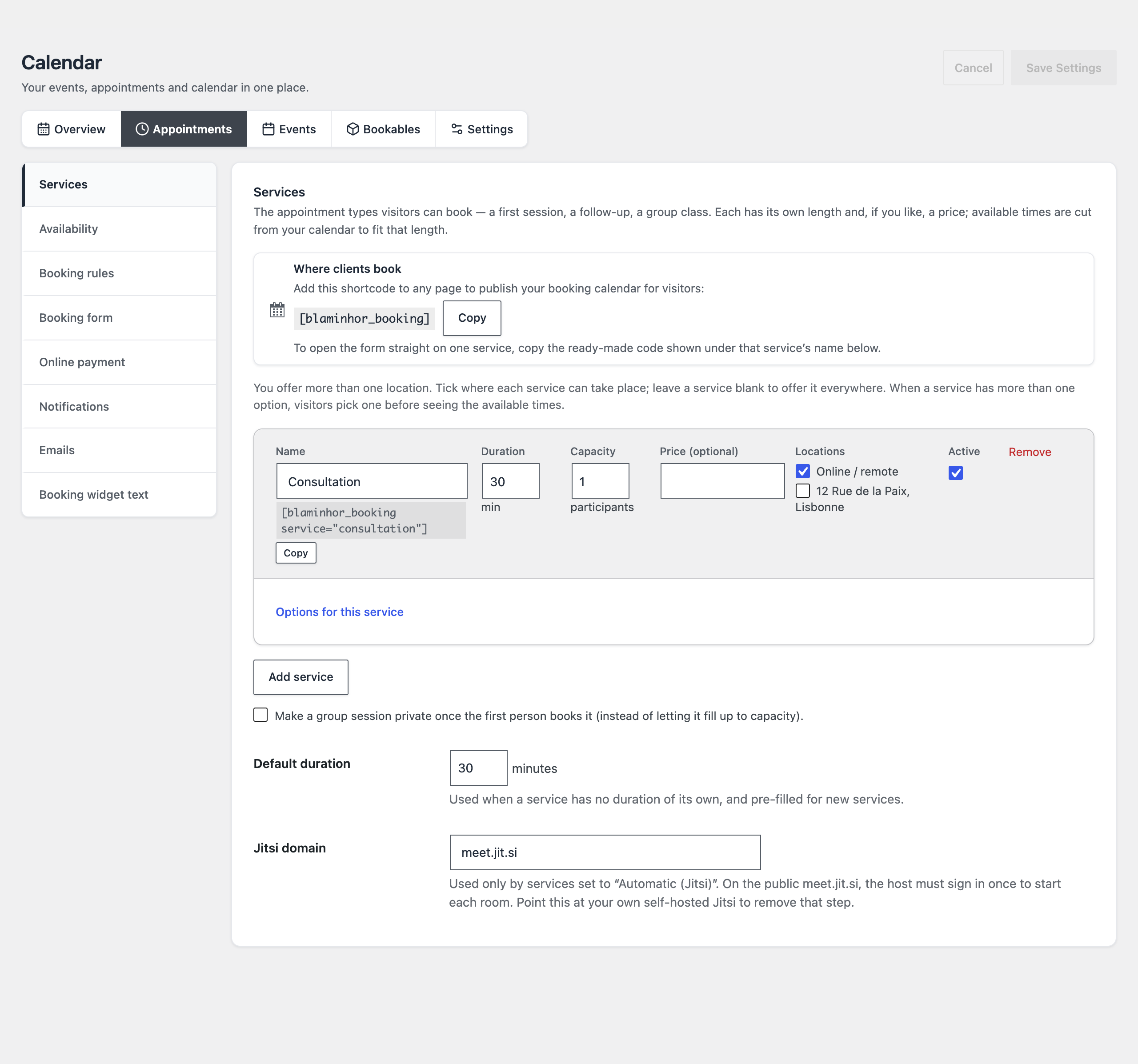 Each service gets its own ready-to-copy shortcode that opens the booking form straight on it. Jitsi video is one field: the domain.
What does it look like day to day?
Like a single agenda, plain and simple. It’s the part I’m proudest of, because it’s what I missed most elsewhere: competitors give you WordPress post lists to sort through; the Calendar module gives you a real calendar grid inside the admin, where events, appointments and rentals live on top of your availability:
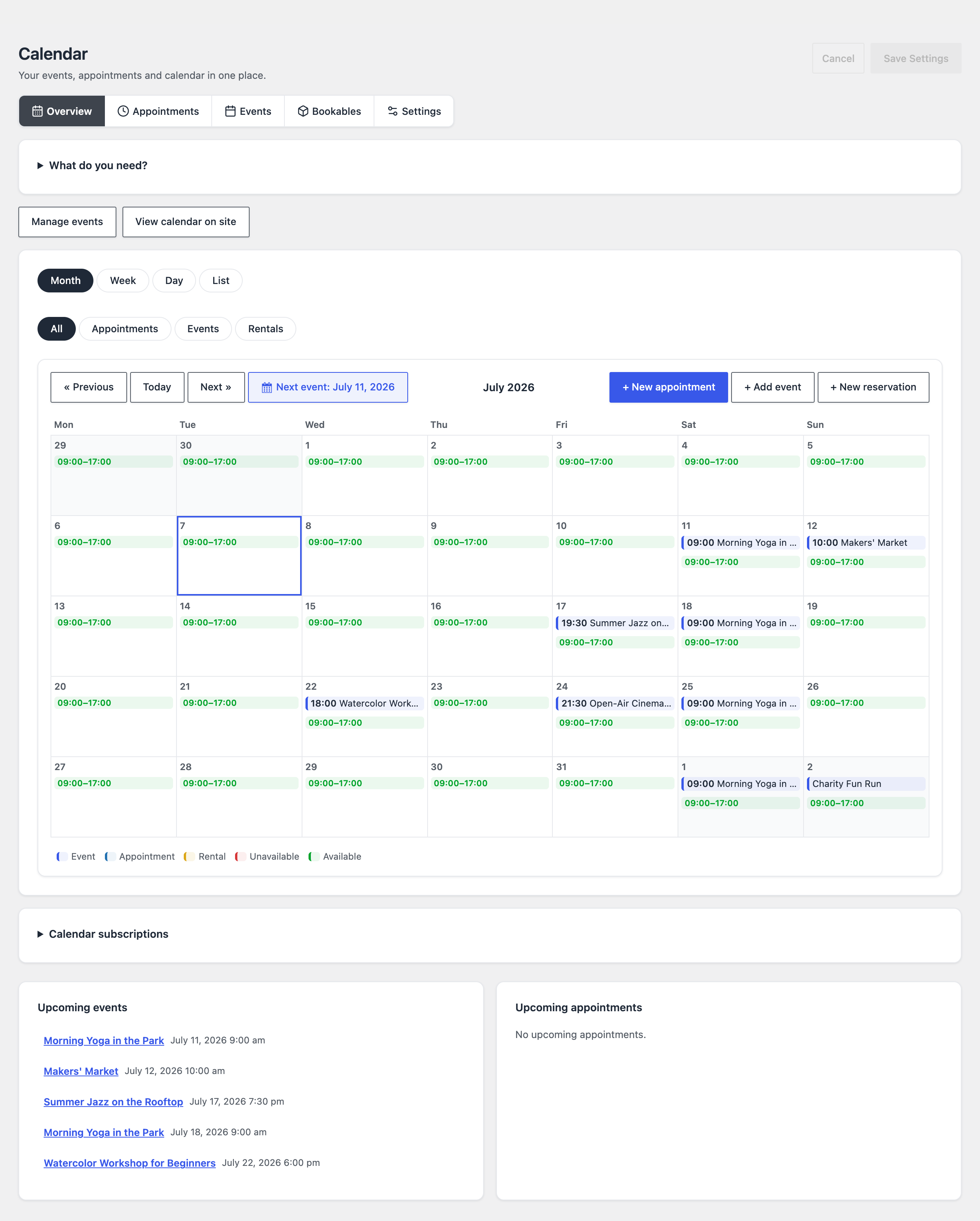 The admin agenda in month view: available ranges in green, events on top, and one click on a day to log an appointment taken over the phone.
From that grid, you click a day to log an appointment taken over the phone, click an existing appointment to reschedule it or fix a misspelled email, and the Next appointment button jumps straight to your next booking. Every automatic email — confirmation, reminder, cancellation, waitlist — has its own editor with merge tags, and its own on/off switch if you prefer silence.
A word for the technically inclined, because no screenshot shows it: the whole module is also scriptable through WP-CLI (wp blaminhor calendar …) — create an appointment, export sign-ups to CSV, geocode a venue, run the reminders. If you manage sites from the command line or with an AI assistant, it’s a real plus.
What are the Calendar module’s limits?
There are some, and you deserve to know them before installing rather than after. The module is still flagged Beta: it’s built to work, but a “report it to me” button stays on screen — and I fix things fast.
- One agenda. The appointment system assumes one practitioner, or a team sharing the same schedule. No multi-staff with separate calendars — if you run a salon with five independent stylists, Amelia remains the better fit.
- Stripe only. No PayPal, no WooCommerce, no built-in VAT invoicing.
- No Google/Outlook API sync. Interoperability goes through iCal/webcal (subscriptions both ways), not a two-way OAuth connection. No Zoom or Google Meet either: video means Jitsi or your own URL.
- Recurrence covers the common cases (daily, multi-day weekly, monthly, yearly, ending by date or count) but not yet exotic rules like “the second Tuesday of the month” from the UI.
- No map or photo view of the calendar like TEC Pro offered — the map lives on each event’s page.
But keep one thing in mind: these limits are a snapshot, not a ceiling. The plugin has grown module by module based on real needs — mine first, then its users’. If one of these limits blocks you, tell me (the feedback button sits permanently in the module, and the WordPress.org support forum lands straight in my inbox): if the demand is there, I’ll build it. That’s how the calendar gained recurring series, the waitlist and Jitsi video, release after release.
If one of these limits is a dealbreaker for you today, the paid competitors in the table keep their reason to exist. For everyone else — the association, the freelancer, the town hall, the music school, the therapist — the module covers the whole need without a single dollar changing hands.
How much does it cost, and where’s the catch?
Zero, and there isn’t one. Blaminhor Essentials is open source under the GPL, published on the official WordPress.org repository. No “Pro” version that unlocks recurrence, no account to create, no telemetry phoning home. The Calendar module is one of the plugin’s twenty-plus modules — each with its own switch, and a disabled module loads strictly no code. So you can enable the calendar and nothing else.
Why free? Because I built this plugin for my own sites first, and selling it piece by piece would reproduce exactly the model that’s pushing The Events Calendar users out the door today. The calendar was the most ambitious module on the list; it’s also, I believe, the best argument for discovering the others.
You can install it from your dashboard via Plugins → Add New, searching for “Blaminhor Essentials”, then enable the Calendar module and pick your natures (events, appointments, rentals). Migration from The Events Calendar included, you’re up and running in an afternoon — preview first, risk-free.
– blaminhor
FAQ
Is the free version of The Events Calendar still available?
Yes. The free The Events Calendar plugin is still published and maintained on WordPress.org (version 6.16.5.1 as of July 2026), now under the author name Nexcess. What changed is the paid offering: the standalone Pro plugin is no longer sold, replaced by Liquid Web bundles starting at $259/year, and theeventscalendar.com now redirects to liquidweb.com.
Does the Calendar module work with Divi, Elementor or any theme?
Yes. The calendar renders through a shortcode ([blaminhor_events]), a Gutenberg block or its automatic archive page, and works with any theme. The single-event and archive templates can also be overridden by your theme through a be-events/ folder if you want a fully custom design.
Can I sync the calendar with Google Calendar or Apple Calendar?
Both ways, through iCal: every event offers a .ics file, the whole calendar exposes a public webcal:// feed that Google Calendar or Apple Calendar can subscribe to, and your appointments get a private token-protected feed. In the other direction, the module imports a .ics file or feed URL, refreshed daily. There is no two-way Google API sync.
Can I sell paid tickets with the Calendar module?
Yes. Each event can offer several ticket tiers (each with its own price and quota), charged through Stripe, with percentage or fixed-amount promo codes. The module does not rely on WooCommerce or PayPal: Stripe is the only payment gateway.
Is the Calendar module GDPR-compliant?
It was built for it: every sign-up and booking stores an explicit consent, IP addresses are only kept as salted hashes, visitors manage and cancel their own appointments without creating an account, and the administrator can export or delete a participant's data.
Is the plugin translated?
Yes. Blaminhor Essentials ships in 11 languages — including fully maintained French, German, Spanish, Italian, Portuguese, Japanese, Russian and Turkish. The admin interface, the public calendar, the booking widget and the automatic emails all follow your site language.
Do I have to enable all of Blaminhor Essentials to use the calendar?
No. Blaminhor Essentials is modular: you can enable only the Calendar module and leave everything else off. A disabled module loads no code at all — no PHP, no database queries, no assets — so the plugin stays light even though it contains more than twenty tools.
Comments