
WordPress Appointment Booking, Free — No Calendly Fee
Amelia, Bookly and Calendly charge $49 to $400 a year for appointment booking. The Calendar module in Blaminhor Essentials does it for free, on your own site.

Online appointment booking has turned into a toll booth: Calendly costs $120 per seat per year the moment you need more than one event type, Amelia starts at $49 a year, Bookly climbs to $249. For a therapist, a craftsman, a coach or a nonprofit, that’s a lot of money for “pick a slot, get an email”. Good news: if your site runs on WordPress, the Calendar module in Blaminhor Essentials does all of it for free, on your own site, with your own data. Here’s how to set it up, step by step, screenshots included.
The essentials
- $0 and no quotas: unlimited services, appointments and clients — where free Calendly stops at 1 event type and its paid plans run $10/seat/month (checked July 7, 2026).
- Your data stays home: bookings live in your WordPress database, with stored GDPR consent and hashed IPs — nothing goes to a third party.
- Clients never create an account: a magic email link lets them manage, reschedule or cancel on their own.
- Automatic email reminders (with an .ics invitation attached) and auto-generated Jitsi video rooms — no account, no API key.
- Two bookings can never collide: every slot is protected by a database-level lock.
Why pay $50–400 a year for appointments?
That’s the real question — and the honest answer is: most solo professionals don’t need to. Paid tools earn their keep for teams (several practitioners, several calendars), deep integrations (Zoom, CRM, SMS) or enterprise volume. For a single agenda, here’s what the market costs, checked on the vendors’ official pages on July 7, 2026:
| Tool | Price (1 calendar) | No client account? | Video included | Data on your site? |
|---|---|---|---|---|
| Calendly | Free (1 event type), then $10/seat/mo | Yes | Paid integrations | No (SaaS) |
| Amelia | $49–149/yr (promo) | Yes | Zoom/Meet (paid) | Yes |
| Bookly | $49–249/yr | Yes | Via addons | Yes |
| Simply Schedule Appointments | $99–399/yr | Yes | Zoom (paid) | Yes |
| Blaminhor Essentials – Calendar | $0 | Yes (magic link) | Jitsi, free | Yes |
Calendly deserves one more sentence, because it’s everyone’s reflex: it’s an excellent product, but your booking page lives on their domain, under their brand, with your client data — and the day you need a second appointment type, you start paying monthly. A plugin integrated into your own site flips that power balance. Let’s set it up.
How do I enable appointment booking on WordPress?
Three clicks: install Blaminhor Essentials, enable the Calendar module, tick the “appointments” nature. In detail:
- In your dashboard, open Plugins → Add New and search for “Blaminhor Essentials” (or grab it from the official repository). Install, activate.
- Open the Blaminhor menu and switch on the Calendar module.
- The module works through switchable “natures”: tick Individual appointments (1) — and, if you also run group classes, Group sessions. Whatever you leave off stays invisible, in the admin and on the site.
A setup-progress guide walks you through the rest — but let’s tour the two screens that matter.
How do I define services and availability?
A service is what the client books (duration, capacity, optional price, location); availability is when they can. Both live in the module’s Appointments tab.
Each service carries its duration (30, 45, 90 minutes…), its capacity (1 for one-on-ones, more for a group class), an optional price and its possible locations: your office, the client’s home, or online. Each service even gets a ready-to-copy shortcode that opens the booking form straight on it:
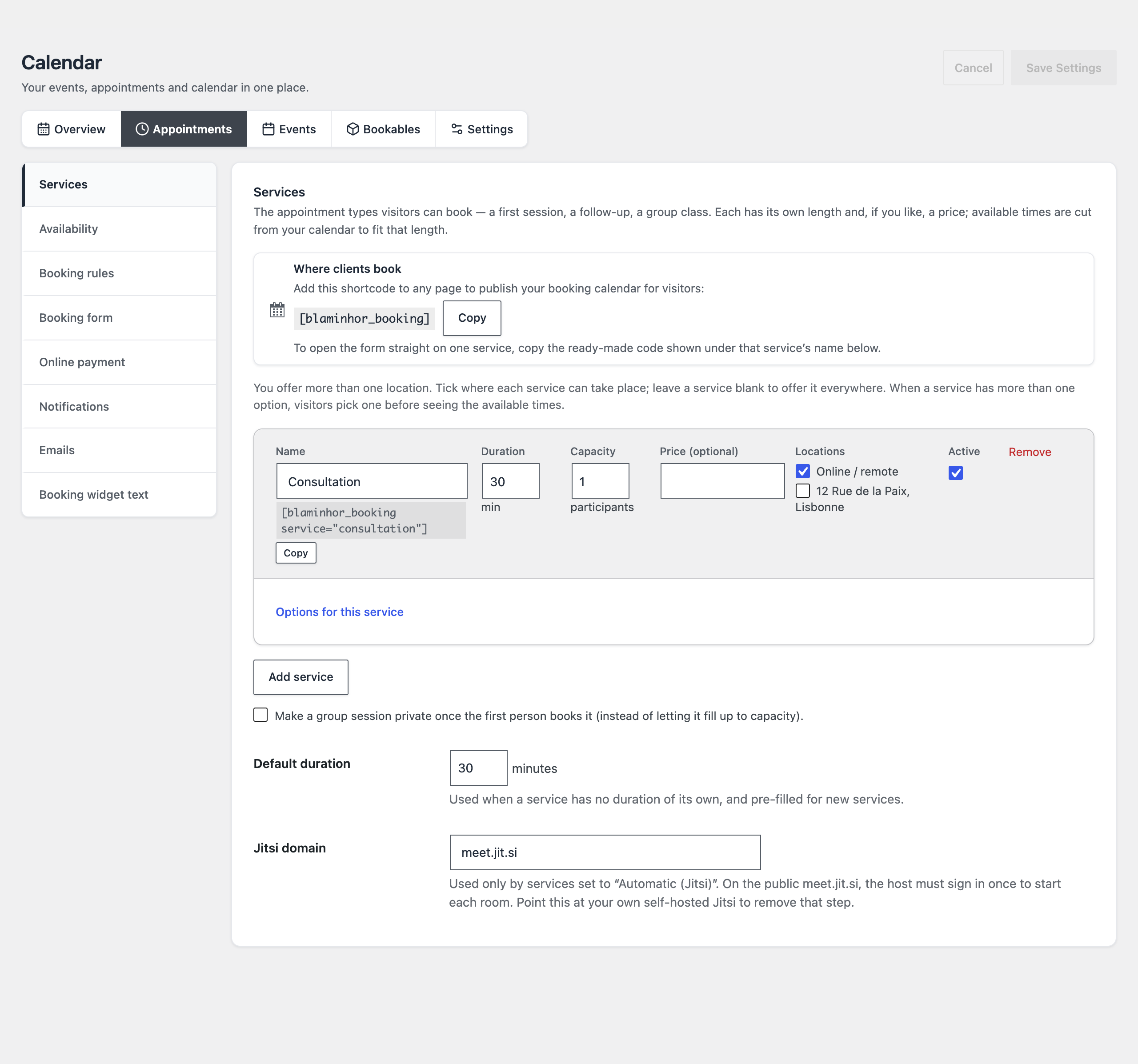 One service, one row — and the
 [blaminhor_booking service="…"] shortcode ready to paste into any page.
Availability works the way you think: your workplaces, then a weekly grid (say 9 am – 5 pm with a lunch break, by adding two ranges to the same day), an optional repeat-every-N-weeks rhythm if you alternate, and a calendar of closed days and time off that bookings skip automatically. If your schedule is irregular, the “specific dates” mode flips the logic: everything is closed, and you open dates one by one.
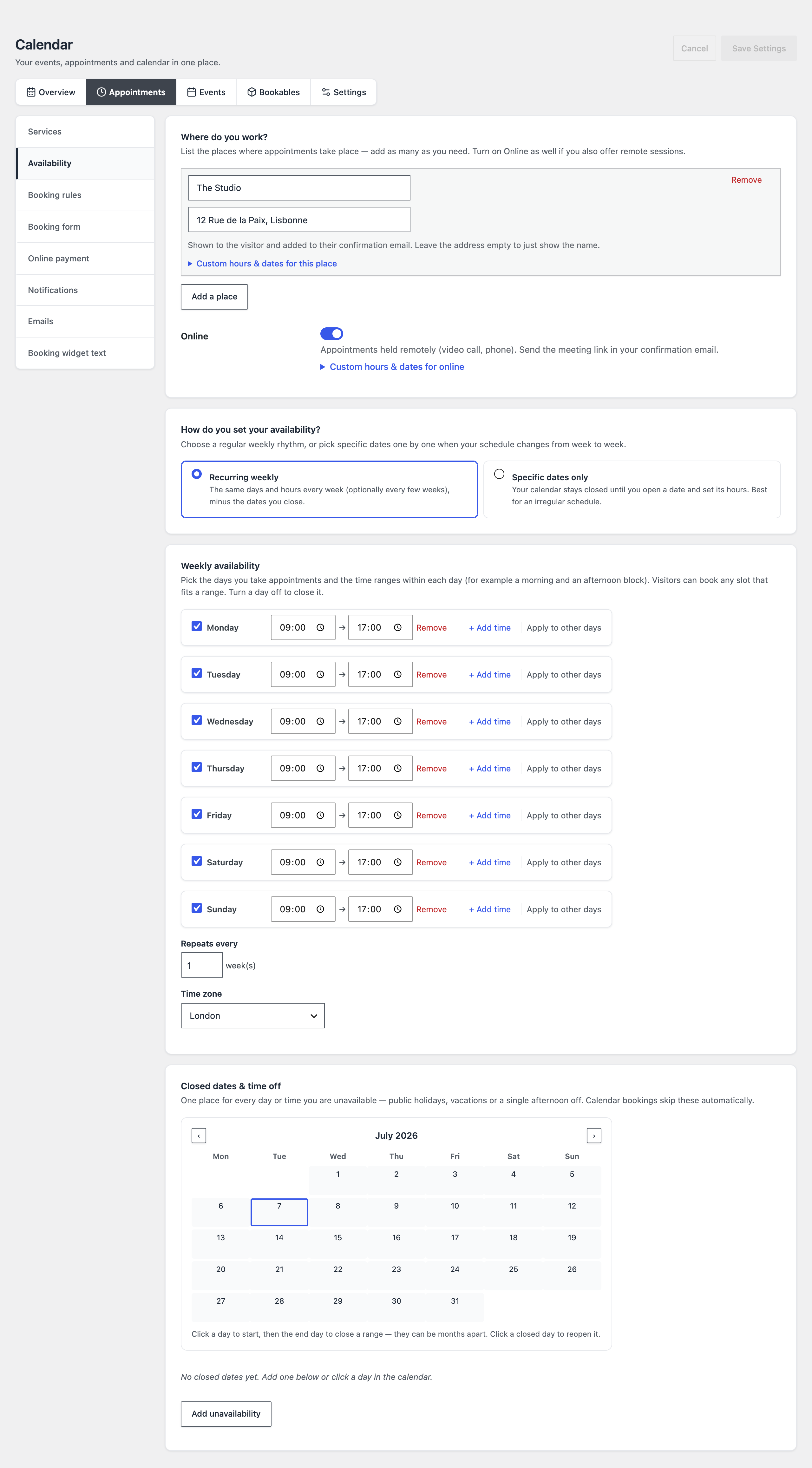 Places, weekly grid, time off: three blocks and your real-life schedule is modeled.
Fine-tune the rules if you need to: minimum notice (24 h by default — no more bookings for ten minutes from now), booking horizon, buffer time between appointments, back-to-back or spaced slots. Every option comes with a plain-language explanation; you only touch what applies to you.
What does booking look like for your clients?
Like a Calendly — but on your site, in your colors. Paste [blaminhor_booking] into a “Book an appointment” page, and visitors see the week with the genuinely free slots, computed from your grid, your time off and the bookings already taken:
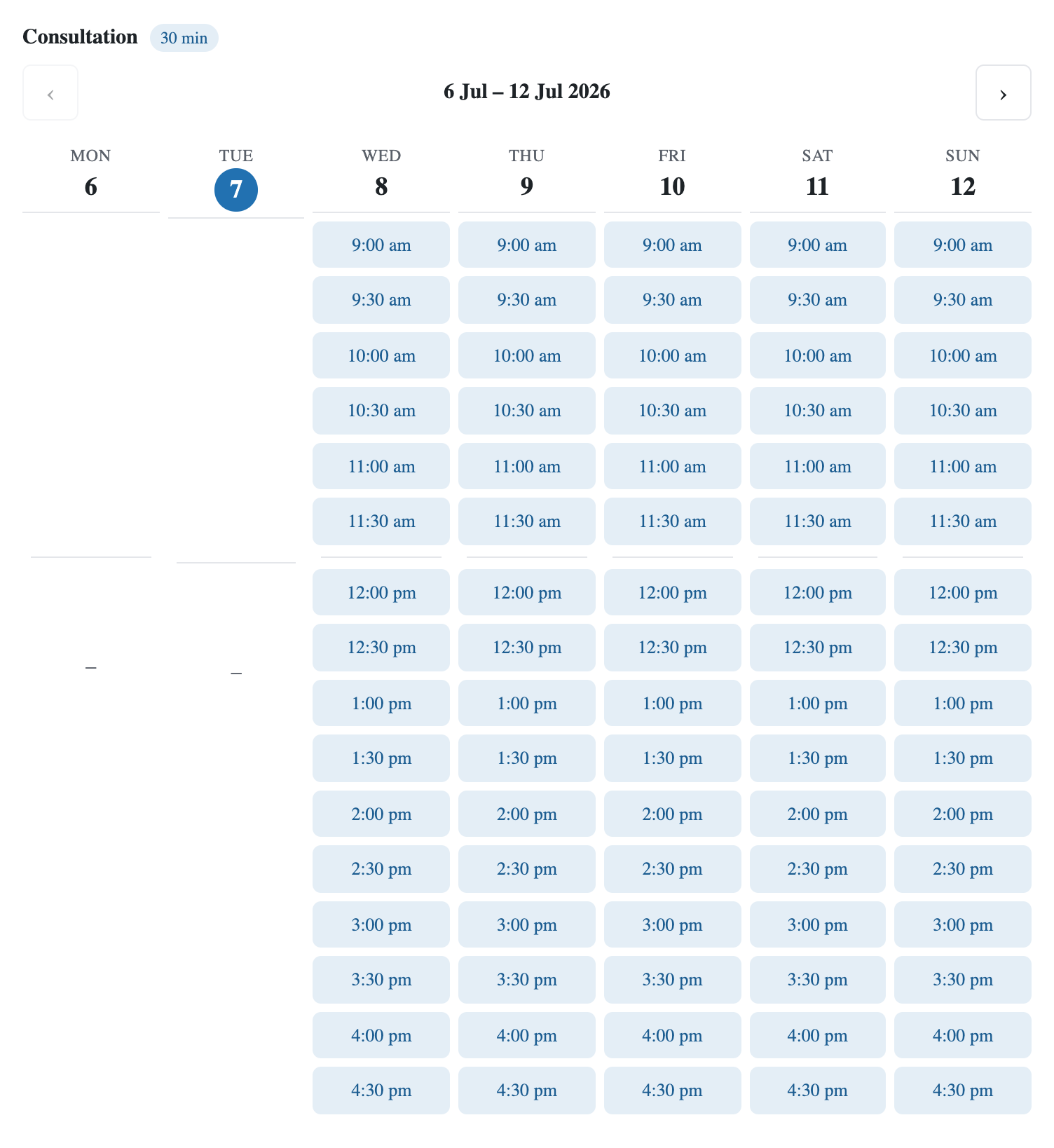 The public widget: clients only see what’s truly free — notice, buffers and holidays already deducted.
One click on a slot, and only the essentials remain — name, email, optional phone and notes, and the consent checkbox:
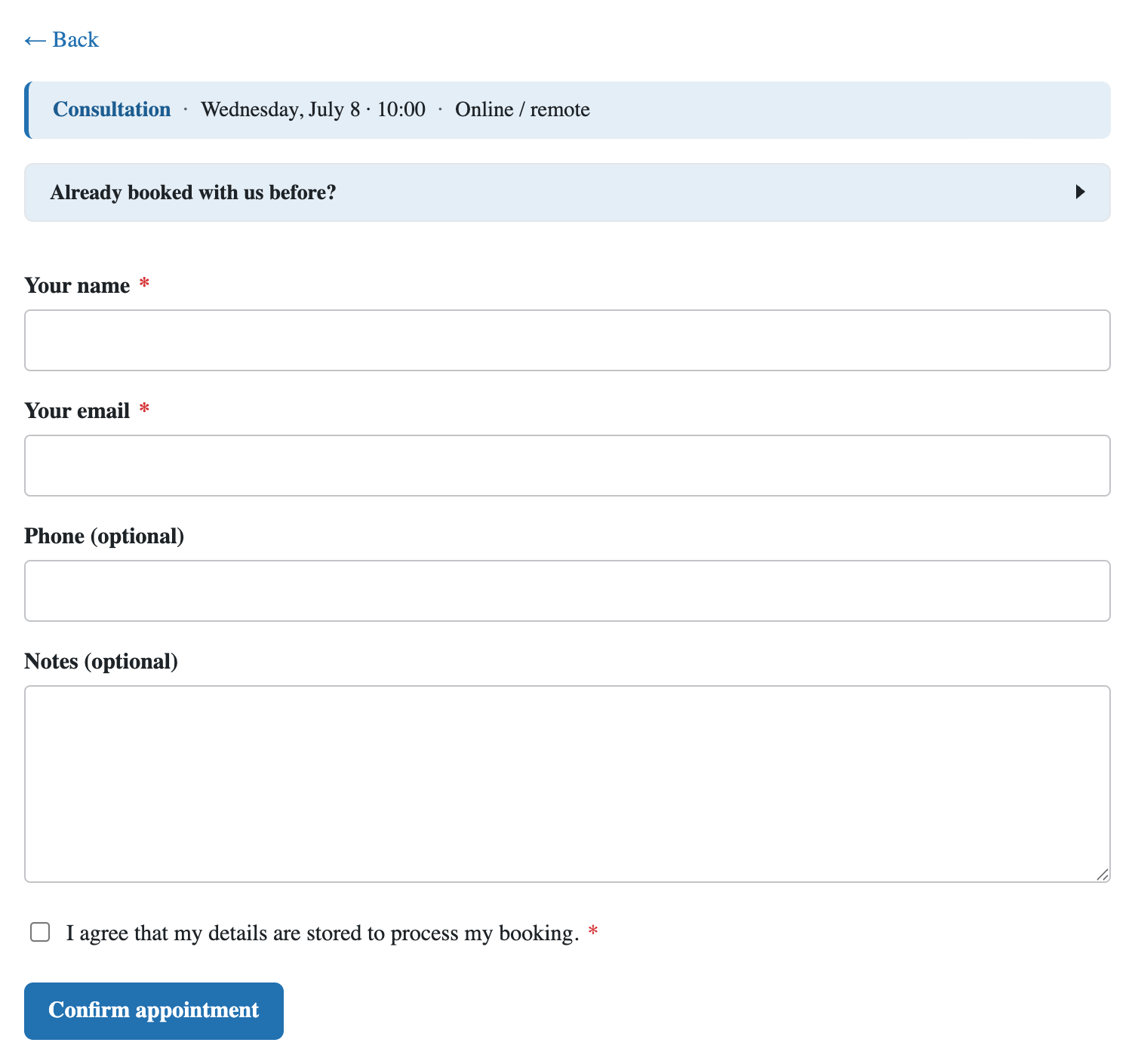 No account creation, no password: a summary, two required fields, one GDPR checkbox.
And afterwards? This is where the module beats a lot of paid tools. Clients manage their appointments themselves, without an account: their confirmation email contains a secure link (a time-limited “magic link” — 45 days) that opens their personal area, where they can move the appointment to another free slot, fix their contact details or cancel. They can even book a recurring series — the same slot every week or fortnight — in one go, and cancel it as a whole. Every move re-checks availability: double-booking is technically impossible, since every write is protected by a database lock.
How do I prevent forgotten appointments and no-shows?
With the automatic emails — provided they arrive. The module sends a confirmation (with an .ics invitation the client adds to their calendar), a reminder at the lead time you choose, a cancellation notice, and a notification to you for every new booking. Each email has its own editor with merge tags ({name}, {service_note}, the manage link…) and its own switch: turn off what you don’t need.
For remote appointments, enable video calls: either a fixed room URL (your personal Zoom or Meet link, if you have one), or Jitsi on automatic — the module generates a unique room per appointment, free, with no account or API key, and drops it into the confirmation email. And if you charge for sessions, connect Stripe: payment happens at booking time, and a duplicated payment return can neither create a double booking nor trigger a false refund.
What are the limits, honestly?
The module targets the single agenda — the freelancer, the solo practice, the association. Its current limits, so you can decide with open eyes:
- No multi-staff with separate calendars: a salon with five independent stylists is better served by Amelia.
- Email reminders only — no SMS.
- Stripe only for payments (no PayPal), and no Google Calendar API sync (interoperability goes through iCal/webcal feeds, both ways).
- The module is in beta: built to work, with a permanent feedback button — and fast fixes.
These limits move: the plugin grows with real demand. If one of them blocks you, tell me — if the demand is there, I’ll build it. That’s already how recurring series, the waitlist and Jitsi video arrived.
So how much does it cost, really?
Nothing — and it’s not a teaser version. The appointments system is part of Blaminhor Essentials, free and open source (GPL) on the official WordPress.org repository. No premium tier, no booking quota, no telemetry. You can enable the calendar alone and leave the other twenty modules off — a disabled module loads no code at all.
And if your needs grow beyond appointments — publishing events, selling tickets, renting out gear — the same module does all of that too: I covered that side in my guide to the free events calendar that replaces The Events Calendar Pro.
– blaminhor
FAQ
Why choose a booking plugin over Calendly?
With Calendly, your availability, your clients and their data live on someone else's servers, your booking page carries their branding, and the free plan stops at one event type. An integrated plugin keeps everything on your site: the data is yours, the page is yours, and services are unlimited.
Do my clients need to create an account to book?
Never. The visitor picks a slot, types a name and an email — that's it. To manage, reschedule or cancel, they receive a secure email link (valid 45 days) that identifies them without any password or registration.
Is there a limit on appointments or services?
No. Services, appointments, clients: everything is unlimited. There is no premium tier and no quota — the module is entirely free, published under the GPL on the official WordPress.org repository.
Can it send SMS reminders?
No — reminders go out by email only (with an .ics invitation attached), at the lead time you choose. There is no SMS channel; that's one real difference with the paid tiers of Amelia or Bookly, which offer it through extra credits.
Can I sync appointments with Google Calendar?
Yes, through an iCal subscription: your appointments expose a private, token-protected feed (revocable at any time) that Google Calendar, Apple Calendar or Outlook can subscribe to via webcal://. There is no two-way Google API sync.
Is the booking form GDPR-compliant?
Yes: an explicit consent is stored with every booking, IP addresses are only kept as salted hashes, the administrator can export or delete a client's data, and the self-service area lets clients act on their own appointments without an account.
Does it work with Elementor, Divi or my theme?
Yes. The booking widget drops into any page through a shortcode ([blaminhor_booking]), whatever the builder or theme, and its colors are customizable in the settings to match your brand.
Comments