
WordPress Email Deliverability: SPF, DKIM, DMARC (2026)
Gmail now rejects poorly authenticated email: SPF, DKIM and DMARC explained simply, and how to make WordPress sending reliable with a relay and a log.

The worst email bug shows no error at all: WordPress says “message sent,” and the message already no longer exists—discarded by Gmail without a word, because it arrived from some anonymous shared server, with no signature and no authorization. Your customer is waiting for their order confirmation, you’re waiting for the notification, and each of you thinks the other has a problem. Since 2024, the major mailbox providers have turned their recommendations into requirements: an unauthenticated email is no longer “at risk”—it’s refused. Here’s the full mechanism—the three scary DNS acronyms, and the module that takes care of the rest.
The essentials
- Since February 2024, Gmail and Yahoo reject—no longer just spam-folder—emails without SPF/DKIM authentication; DMARC is added for bulk senders. Microsoft followed in 2025.
- SPF authorizes, DKIM signs, DMARC arbitrates: three DNS records at your registrar, half an hour of work, good for years.
- PHP’s mail function, WordPress’s default, sends from a server with no reputation and no signature: it’s the number one cause of ghost emails.
- The SMTP module includes for free what the market charges for: email log, one-click resend, automatic backup relay.
- By default, the log stores metadata only—no content—and password reset links are always masked.
Why do your WordPress emails vanish without an error?
Because “sent” and “delivered” are two different events, separated by the most expeditious court on the web: the receiving filter. WordPress hands the message to PHP’s mail function, which passes it on to your shared host’s server; on arrival, Gmail looks at who’s sending, checks whether that server is allowed to speak for your domain, looks for a signature—and finding none of it, throws the message away. No error comes back: as far as WordPress knows, the send succeeded.
The image I always use: it’s a story about showing your credentials at the door. Your email turns up at Gmail’s gate like an unknown delivery driver—no uniform, no badge—claiming to work for you. Ten years ago, he’d have been let in with a sideways glance—the spam folder. Today, the door no longer opens: since February 2024, Gmail and Yahoo require every sender to present at least SPF or DKIM, and flatly reject messages that fail. This crackdown, designed to fight identity theft (“spoofing”), sweeps up every legitimate but misconfigured site in its net—which is to say, the vast majority of freshly installed WordPress sites.
SPF, DKIM, DMARC: what do these three acronyms actually do?
They’re the three parts of your domain’s ID badge: SPF is the list of authorized badge holders, DKIM the tamper-proof seal on each message, DMARC the standing orders given to the doorman when the badge doesn’t check out. Three DNS records to set at your registrar—not in WordPress.
- SPF (Sender Policy Framework) is a public record that says: “here are the servers allowed to send email for my-domain.com.” When you go through a relay—Brevo, say—you add Brevo’s server to that list. Any server outside the list claiming to send for you fails the check.
- DKIM (DomainKeys Identified Mail) has each message signed with a private cryptographic key; the public key, published in your DNS, lets the recipient verify the message really came from you and wasn’t modified in transit. It’s the wax seal, mathematical edition.
- DMARC completes the set by publishing your policy: what should happen to a message that fails SPF and DKIM?
none(deliver anyway, but tell me),quarantine(spam),reject(refuse). And it sends you reports—invaluable for discovering who’s trying to impersonate your domain.
The good news: your relay provider hands you the exact values to copy-paste, and the whole operation—half an hour at your registrar—is done once and holds for years. Start DMARC in none mode while you review the reports, then tighten it.
How do you make sending reliable with the SMTP module?
Pick a relay provider, paste its credentials into the module, send the test email—and, if you like, add a backup relay that automatically takes over when the primary goes down.
- Create an account with a relay provider. Brevo is my usual pick—generous free tier; SendGrid, Mailgun, Amazon SES, Postmark, SMTP2GO and the rest are preconfigured the same way, 12 providers in all.
- In Blaminhor Essentials, enable the SMTP module and add your relay: the server settings come prefilled; all that’s left is your credentials and the sending address.
- Send the test email from the module, and check that it lands—in the inbox, not in spam.
- Add a backup relay: if the primary send fails—quota hit, outage, revoked key—the module automatically switches to the second. Your password resets no longer depend on a single provider.
- Set your SPF, DKIM, DMARC records at your registrar with the values your relay gives you—the DNS step from the previous section.
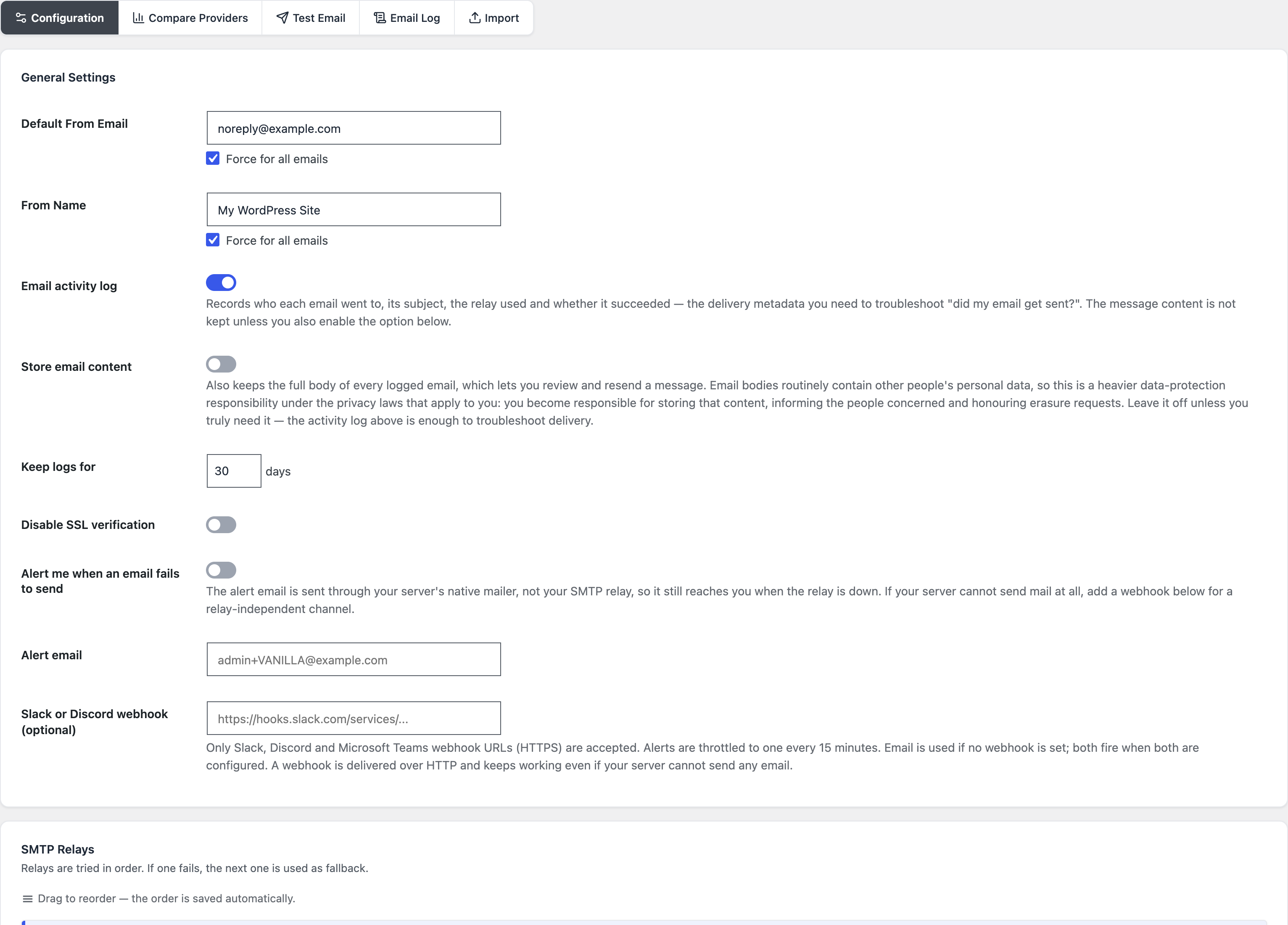
If you already use WP Mail SMTP, Post SMTP, or Easy WP SMTP, an importer picks up your configuration in one click—you don’t start from scratch, and you gain the log and the automatic backup in the process.
The email log: the end of “I never got it”
Every send is recorded—recipient, subject, status, timestamp—and every failed send carries a resend button, once you’ve enabled content storage in the log settings: when a customer swears they received nothing, you no longer argue, you check, and you resend in one click. It’s the feature that changes day-to-day support, and it’s precisely the one the market has filed behind a paywall—at WP Mail SMTP as at Email Log, the full log or the resend belong to Pro.
The design deserves a closer look, because an email log is a sensitive object. By default, the module does not store message content—metadata only. Storing email bodies means potentially storing your users’ personal data; the option exists, but it’s explicit, comes with a warning spelled out in the interface, and password reset links are masked in the logs no matter what—a log should never turn into a key ring. Retention is adjustable from 1 to 365 days, automatic purge included.
I built the whole chain on a test site for this article’s screenshots—relay added, test email sent, log recording the send: the circuit can be verified end to end from the admin, without touching the server.
The comparison in one table
| Criteria | Default wp_mail() | WP Mail SMTP (free) | Blaminhor Essentials SMTP module |
|---|---|---|---|
| Authenticated sending via a relay | No | Yes | Yes, 12 preconfigured providers |
| Email log | No | Pro (~$49/year) | Free (metadata by default) |
| Resend an email | No | Pro | Free, one click |
| Automatic backup relay | No | No | Yes |
| Import existing configuration | — | — | WP Mail SMTP, Post SMTP, Easy WP SMTP |
| SPF/DKIM/DMARC | Yours to set, in DNS | Yours to set, in DNS | Yours to set, in DNS—no one can do it for you |
Where do you start if your emails already land in spam?
In diagnostic order: check your domain’s authentication with an online test, plug in a relay if you’re still on PHP’s mail function, set the three DNS records, then test again. Free tools like spam-score testers give you the SPF/DKIM/DMARC verdict on your current setup in a minute—start there; the problem is almost always in that column.
And if your exact case is “emails go out through Brevo but land in spam,” I’ve devoted an entire article to that scenario—the SMTP + DNS duo, walked through step by step. To understand the difference between these transactional emails and a newsletter, the definition of transactional email lays out the vocabulary.
Email is a critical service disguised as a detail
As long as everything works, nobody thinks about WordPress emails; the day a password reset goes missing, that’s a user locked out, and the day an order confirmation disappears, that’s a customer lost. Half an hour of DNS, a free relay, a log that proves it—and the subject is closed for years.
The SMTP module is one of the free modules in Blaminhor Essentials, the modular plugin—and if you’re structuring your content while you’re at it, the automatic table of contents and key takeaways are the same promise applied to SEO: the full feature, no invoice.
FAQ
Why don't WordPress emails arrive, even with no error?
Because WordPress sends them through PHP's mail function, from a shared server with no reputation and no authentication: inboxes file them as spam or reject them silently. The site says “sent”—technically true, but the destination threw the message away. The fix is a real, authenticated SMTP relay.
What are SPF, DKIM and DMARC, in one sentence each?
SPF publicly lists the servers allowed to send for your domain; DKIM stamps every message with a cryptographic signature proving it wasn't altered; DMARC declares what to do with a message that fails both—deliver it, quarantine it, or reject it—and sends you reports about it.
Are these DNS records really mandatory?
Since February 2024, Gmail and Yahoo require SPF or DKIM from every sender, and all three—SPF, DKIM, DMARC—from bulk senders; non-compliant messages are rejected, no longer just filed as spam. Microsoft followed in 2025 for Outlook. This isn't optimization anymore: it's the price of admission.
Is a free SMTP relay enough for a small business site?
Yes. The free tiers of Brevo or SMTP2GO comfortably cover the volumes of a brochure site or a small shop—a few hundred transactional emails a month. You only pay once your volume becomes that of a real mailing list, and at that point email deserves a budget anyway.
What is an email log in WordPress for?
It answers the question “did the site actually send that email?” with proof instead of a hunch: every send is recorded with its recipient, subject, and status. When a customer insists they received nothing, you check in ten seconds—and for a failed send, the resend button ships the message again without redoing the whole operation, provided you've enabled content storage in the log settings.
Does storing sent emails create a GDPR problem?
Storing the content, yes, potentially: that's why the module keeps only metadata by default—recipient, subject, status—and leaves content storage as an explicit opt-in, with password reset links always masked. Retention is adjustable from 1 to 365 days and purges itself.
How is this module different from WP Mail SMTP?
The core job is the same: routing wp_mail through an authenticated relay. The differences: the email log and resend are free here while WP Mail SMTP reserves them for Pro (~$49/year), the module handles an automatic backup relay, and a one-click importer picks up your existing WP Mail SMTP, Post SMTP, or Easy WP SMTP configuration.
Comments