
Contact Form Plugin for WordPress: Keep Every Message
A WordPress contact form that writes every submission to the database before it tries the email: if the email is lost, the message stays. Free, no CAPTCHA.

A visitor fills in your contact form, clicks Send, reads “Thank you, your message has been sent”… and you never receive it. The email went to spam, or never left at all. To them, you ignored them; to you, they never existed. This scenario is common, and it has one precise cause: the message was entrusted to an email and nothing else. The Forms module in Blaminhor Essentials takes the opposite path — it writes first, then it sends.
The essentials
- Contact Form 7 stores nothing by default: the message leaves as an email, and if the email fails, it’s gone. You need to add Flamingo (its official companion) or a database plugin.
- WPForms Lite sends by email; viewing entries inside WordPress is reserved for the paid version — that’s what Google’s AI Overview itself answered, on September 8, 2026, to someone looking for the best free contact form plugin.
- In the Forms module, saving to the database is a checkbox ticked by default (Keep each submission in the database), and it runs before any email attempt.
- Spam protection without a CAPTCHA: an invisible trap field, a signed time-stamped token, a rate limit per hashed IP address. reCAPTCHA and Cloudflare Turnstile remain available, as options.
- GDPR: the IP address is never stored unless you explicitly ask (and then only hashed), retention is set per form with a daily purge, and the consent checkbox is never pre-ticked.
Where do Contact Form 7 submissions go?
By default, Contact Form 7 submissions go nowhere except into an email: the plugin hands the content to WordPress’s mail function, then forgets it. It keeps no copy in the database. If the email lands in spam or is never sent, the message is gone for good.
That behavior is intentional. Contact Form 7 is free, with no paid tier and no upsell, and its author has deliberately kept the plugin minimal: one form, one email. For storage he wrote a second free plugin, Flamingo, which intercepts each submission and stores it in WordPress as a custom post type — a content type like posts or pages, but reserved for messages. Third-party plugins such as CFDB7 or Form Vibes do the same job, and they’re what people usually mean when they search for a “Contact Form 7 database” plugin. Until one of them is installed, every message hangs by a single thread: the email.
The blind spot is that nothing warns you: an absence of messages looks exactly like an absence of visitors. You discover the problem weeks later, when someone reaches you through another channel: “I contacted you twice through your website.”
Why does a contact form email get lost so often?
A form’s email gets lost because WordPress sends it, by default, through PHP’s mail() function: an unauthenticated send, from a shared server hosting hundreds of other sites, without the signatures Gmail and Outlook now require. The result is the spam folder, or a silent rejection.
Three causes cover almost every case:
- The host blocks or throttles
mail()— some shared hosts disable it, others cap sends per hour. The form, meanwhile, says “sent” no matter what. - The domain isn’t authenticated: without SPF, DKIM and DMARC — the three signatures detailed in the WordPress email deliverability guide — the big mailbox providers file the email as suspicious.
- The form itself spoofs the sender: sending “from” the visitor’s address, from your server, triggers exactly the anti-spoofing protections those providers run.
The fix on the email side is well known: send through a real SMTP server — the authenticated sending protocol your own mailbox uses — with a relay that signs your emails. But it isn’t enough on its own. A properly configured SMTP reduces losses; it doesn’t eliminate them — a quota exceeded, a relay down for an hour, an over-zealous filtering rule, and the message vanishes again. The only guarantee is a copy that doesn’t depend on email.
How does the Forms module save contact form submissions in WordPress?
The Forms module in Blaminhor Essentials writes the submission to a dedicated table in your database, then attempts the notification email, the auto-responder and the webhook — in that order. Storage is on by default (the “Keep each submission in the database” checkbox), and every message appears on an Entries screen with an unread, read or spam status.
I wrote this module starting from that flaw: in the code, the database write comes before the notification call, and the email then goes through WordPress’s standard mail function — so through the same plugin’s SMTP module, if it’s active. Concretely, when a visitor submits the form:
- The security token (the “nonce”, which proves the submission really came from your site) is checked, then the fields are validated on the server.
- The spam check runs; a suspicious submission is kept with the Spam status but sends no email.
- The entry is written to the database, with the date, the Unread status, and the value of every field.
- The notification email goes to the address of your choice, with the visitor’s address as Reply-To — you answer in one click.
- The auto-responder (if enabled) confirms receipt to the visitor; the webhook (if configured) forwards the entry to your tools — an automatic send to a web address of your choice, for Zapier, Make or n8n.
If step 4 fails, the module writes it to its log — and step 3 has already happened.
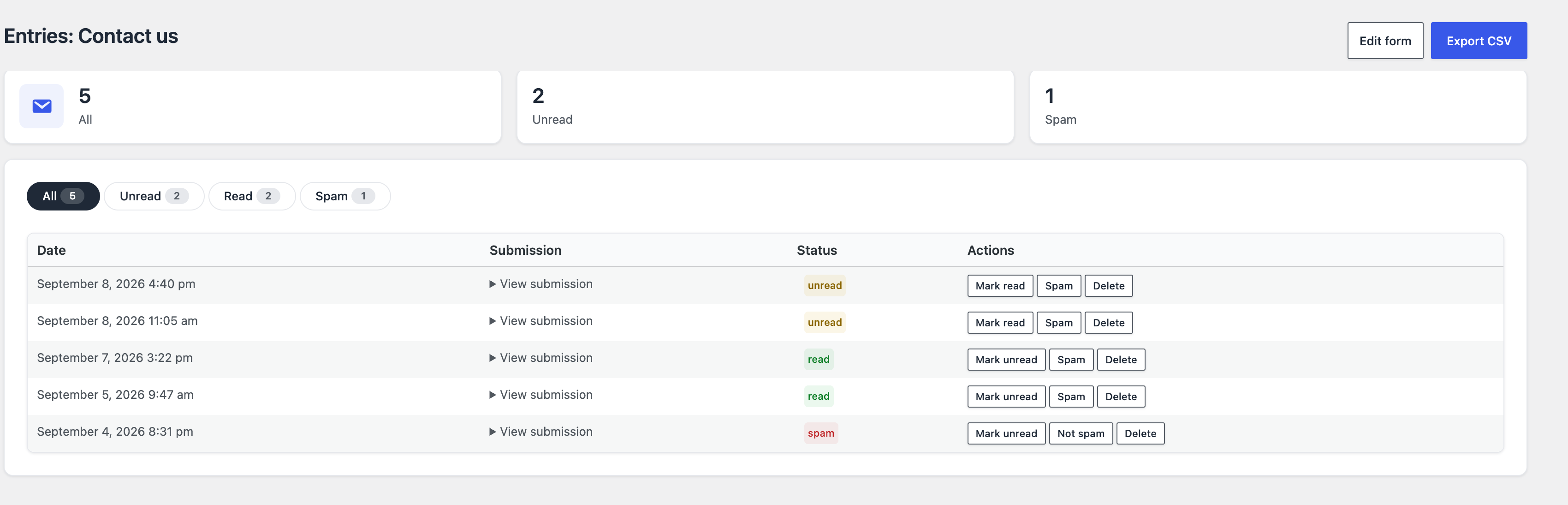
The Entries screen of each form shows the unread count, lets you filter by status, mark as read or spam, and export all your WordPress form entries to CSV (a spreadsheet file that opens in Excel or Numbers). With WP-CLI, WordPress’s command-line tool, wp blaminhor forms resend-notification <id> resends the email for a stored message — typically after repairing a broken SMTP.
What actually happens when you cut the email?
Try it on a staging site: deliberately configure SMTP with a wrong password, send a message through the form, then open the Entries screen. The message is there, status Unread, even though no email left — the plugin’s log simply records the failed notification.
The experiment takes five minutes:
- Enable the Forms module and create a form from the Contact template.
- In the SMTP Mailer module, enter a wrong password — the send is guaranteed to fail.
- Fill in the form at a normal pace (the spam check expects at least two seconds) and submit.
- The confirmation appears; your inbox stays empty; the Entries screen shows 1 unread.
- Fix the password, resend the email with the resend command: this time, it arrives.
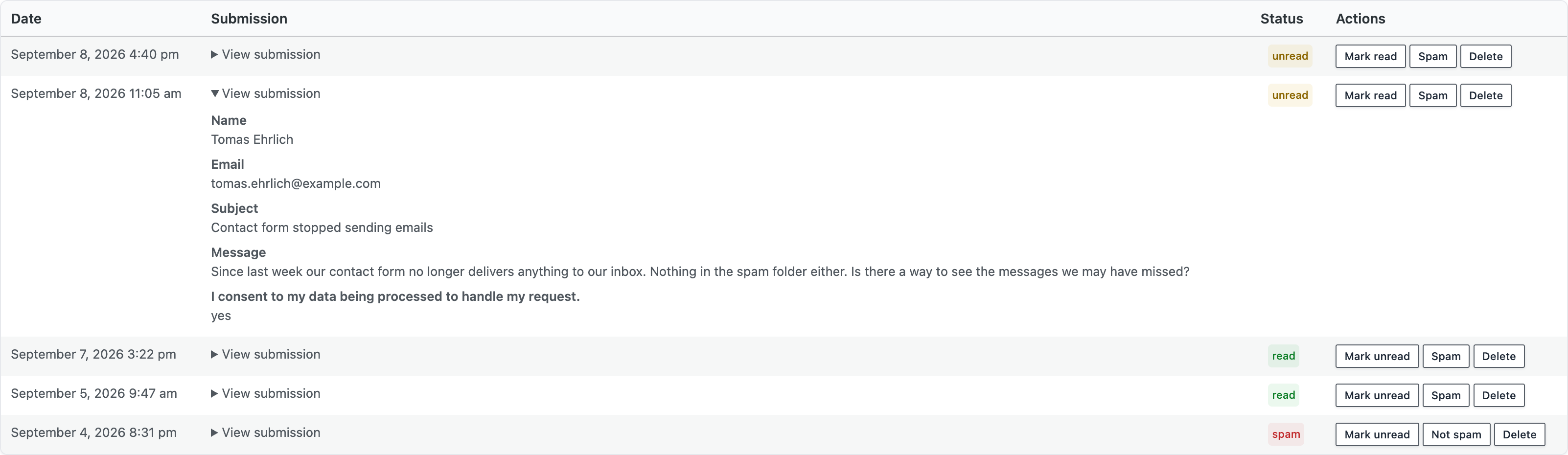
Each row expands in place to show the submitted values, field by field, consent included — no intermediate page to open.
Repeat steps 2 to 4 with Contact Form 7 and no Flamingo: same confirmation, same empty inbox, and no screen to look at. With Contact Form 7 alone, that message no longer exists anywhere; with the Forms module, it’s waiting on the Entries screen.
Which free contact form plugins keep WordPress form entries?
| Plugin (free version) | Is the message stored in WordPress? | If the email fails… | To store, you need… |
|---|---|---|---|
| Contact Form 7 | No | The message is lost | Flamingo (official, free) or a third-party database plugin |
| WPForms Lite | No (entries reserved for the paid version) | The message is lost | Upgrade to WPForms Pro |
| Ninja Forms, Formidable Forms, Fluent Forms | Yes | The message stays available | Nothing: included |
| Blaminhor Essentials Forms module | Yes, before the email is even attempted | The message is in the database, status Unread, failure logged, resend available via WP-CLI | Nothing: ticked by default |
The Contact Form 7 and WPForms Lite rows repeat what AI-powered search engines answered on September 8, 2026: Google’s AI Overview states, about WPForms Lite, that saving entries “directly in your WordPress dashboard requires a paid upgrade or an add-on”; Brave sums up Contact Form 7 the same way. These are two honest products that made two different architecture choices — one minimal, the other freemium. If you’re looking for a WPForms alternative for that one reason, any plugin in the last two rows solves it without paying.
Do you need a CAPTCHA for contact form spam protection?
No: the Forms module protects each form with three invisible checks — a trap field that only bots fill in (a “honeypot”), a signed time-stamped token that rejects any submission sent in under two seconds, and a limit of ten submissions per hour per hashed IP address (turned into an irreversible fingerprint). No image grid, no “I’m not a robot” box.
It’s the same approach as the plugin’s Anti-Spam module, built directly into the form: you can disable the Anti-Spam module, and the form stays protected. The trap field is hidden from screen readers as well as from the eye, so a blind user never stumbles on it — a flaw other anti-spam plugins have had to fix after the fact.
The minimum delay is two seconds by default and can be set form by form, and the rate counter keeps only a hashed fingerprint in a temporary WordPress value (a “transient”) that expires on its own. If your site is hit by human spam, paid by the task, add a reCAPTCHA (v2 or v3) or Cloudflare Turnstile field: it drops in like any other field, the keys are entered once in the module settings, and verification always happens on the server. A second, visible layer — never an obligation.
How do you stay GDPR-compliant with messages stored in the database?
Storing messages creates a processing of personal data, and the Forms module treats it as such: the IP address is never recorded by default (and only hashed if you turn it on), retention is set per form with an automatic daily purge, the consent checkbox is never pre-ticked, and export and deletion are one click away.
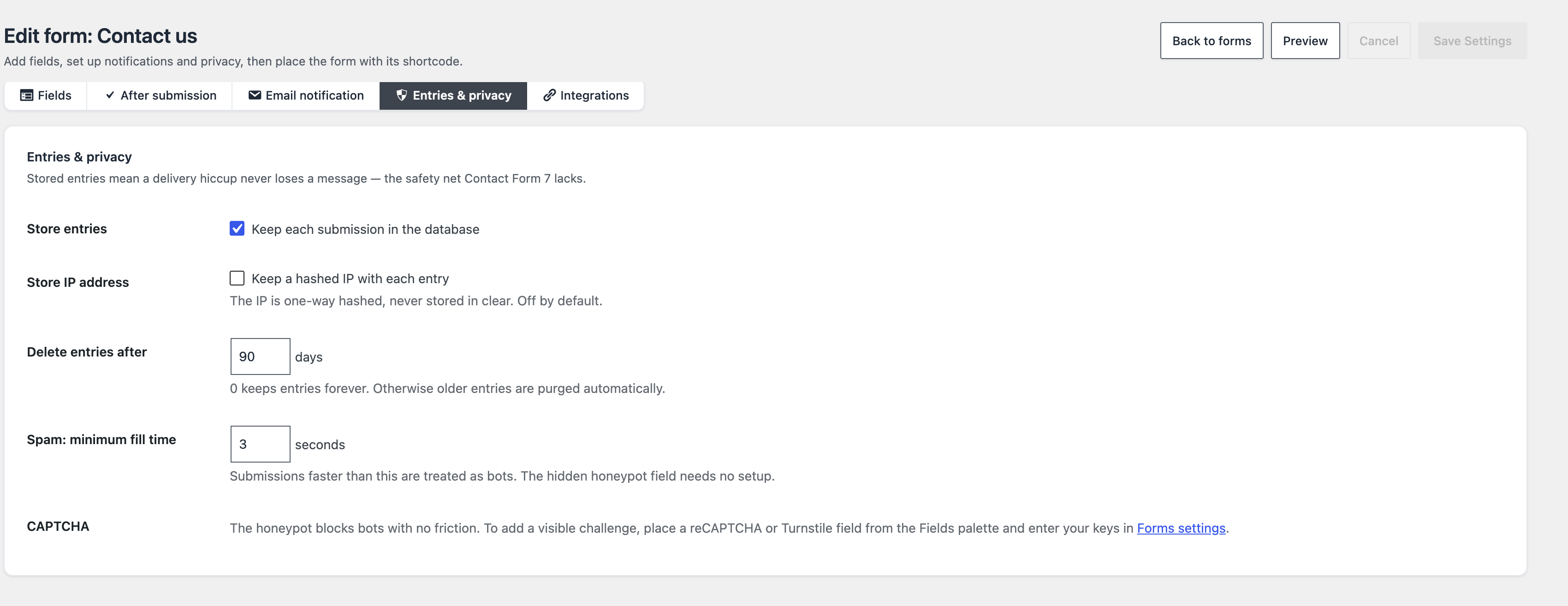
The Delete entries after setting takes a number of days; at zero, entries are kept indefinitely, otherwise a scheduled task runs every day and deletes, form by form, the entries older than the chosen window: thirty days for a contact form, indefinitely for an order form, without one wiping the other’s data.
One confusion is worth clearing up here, because it involves two settings that look alike. On the form side, there’s nothing to turn on: submission storage is ticked from the start. The setting that is deliberately off by default lives elsewhere, in the SMTP module: Store email content keeps the full body of every logged email, so you can reread and resend it from the dashboard. It stays off because an email body routinely contains third parties’ personal data: turning it on means accepting responsibility for it — informing the people concerned, honoring erasure requests. The delivery log alone is enough to diagnose a failing send, and resending a form notification doesn’t depend on that setting: it rebuilds the email from the stored entry.
The Consent field is a field type in its own right, stored as yes/no and impossible to pre-tick — a box already ticked isn’t consent under the GDPR. The Contact, Newsletter and Quote request templates include it out of the box. For trackers, that’s the job of the same plugin’s GDPR cookie banner.
What can the builder do beyond a simple contact form?
The builder offers twenty-four field types — including handwritten signature, star rating, image choice, repeater, file upload and calculation —, conditional logic evaluated on the server as well as in the browser, multi-step or conversational forms, an auto-responder, a JSON webhook, a Gutenberg block and a shortcode.
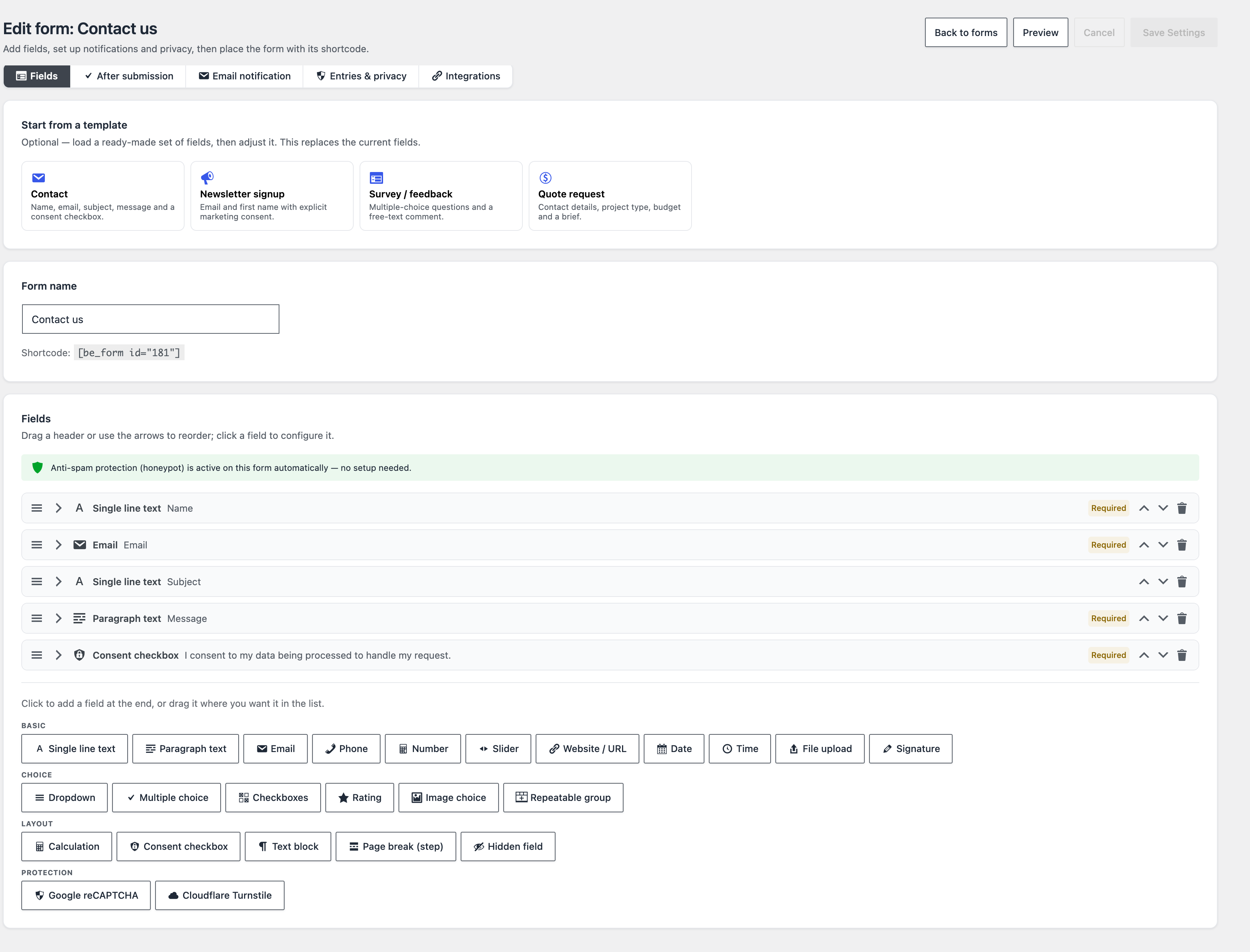
Three choices you’ll notice in use, and one caveat:
- Conditional logic without a validation hole: one rule per field (show if another field has a given value), evaluated in the browser and again on the server — a hidden field is neither validated nor stored.
- Calculation field without
eval(): the formula (four operations, parentheses) goes through a purpose-built evaluator; an unexpected expression fails, it never executes. - Multi-step and conversational mode: a Page break field splits the form into steps with a progress bar; conversational mode shows one field at a time. Without JavaScript, everything displays in one block and submission still works.
- Stripe payment: the form can require a payment through Stripe Checkout, the payment page hosted by Stripe; the entry is only created once the payment is confirmed on the server. Test the whole journey in test mode before going live.
What limits should you know before choosing?
Three, to know before installing: there is no importer from Contact Form 7 or WPForms, resending a notification is done from the command line rather than from a dashboard button, and conditional logic is limited to one rule per field.
On import, the templates bring back a classic contact form in a minute; your old messages, though, stay in Flamingo or in WPForms. Conditional logic accepts a single rule per field: enough for the vast majority of forms, not for a branching questionnaire. If one of these points blocks you, Fluent Forms or Formidable Forms also store entries for free and have been around longer.
What’s left of your messages when the email fails
A contact form exists to get a message to you; email is only its vehicle, convenient and fallible. By writing every submission to the database before attempting the send, the Forms module separates the two: delivery can fail without taking storage down with it.
The Forms module is part of Blaminhor Essentials, the free modular plugin I’m building to replace the stack of single-purpose plugins. Enable it, keep SMTP next to it, and run the wrong-password test.
– blaminhor
FAQ
How do I recover a Contact Form 7 message that never arrived?
Without a storage plugin installed before the send, it no longer exists anywhere: Contact Form 7 keeps no copy, it hands the message to WordPress's mail function and forgets it. Install Flamingo, its official companion, or a module that writes to the database, and check your SMTP sending — you're protecting the next messages, not the ones already lost.
Does WPForms Lite save entries for free?
No. WPForms Lite sends submissions by email; viewing entries in the WordPress dashboard is part of the paid version. It's a deliberate, clearly stated freemium choice. Ninja Forms, Formidable Forms, Fluent Forms and the Forms module in Blaminhor Essentials do store entries in the database without paying.
Can I import my Contact Form 7 or WPForms forms into Blaminhor Essentials?
Not in one click: the Forms module has no importer for those plugins. Four ready-made templates (contact, newsletter, survey, quote request) let you recreate a classic contact form in a minute, with the consent box already in place. Old messages stay in their original plugin.
Does the form work with JavaScript disabled?
Yes. Submission is a classic HTML form post handled on the server; JavaScript only adds comfort (live conditional display, hidden steps, instant calculations). Without it, every step shows at once, the submit button stays, and errors are shown under each field after the page reloads.
Can I export the messages I've received?
Yes, in two ways: an Export CSV button on each form's entries screen, which produces a spreadsheet file with the date, the status and one column per field; and from the command line with WP-CLI (wp blaminhor forms export), handy for an automated export or a migration to another tool.
Are messages sent to a third-party server?
No. Entries are written to a dedicated table in your own WordPress database, on your hosting; nothing passes through an external service. The only possible outbound connections are those you configure explicitly: a webhook to an automation tool, a third-party CAPTCHA, or Stripe payment.
Does a form slow down the rest of the site?
No: the module's stylesheet and script are only loaded on pages that actually contain a form, through the block or the shortcode. A page without a form loads no file from the module. And as with all of Blaminhor Essentials, a disabled module loads no PHP code at all.
Can I send submissions to Zapier, Make or n8n?
Yes, with the form's webhook: every accepted submission is sent as JSON to the URL of your choice, without slowing the visitor down. If the send fails, a single retry is scheduled five minutes later; private-network addresses are refused so a public form can't be used as a probe against your own server.
Comments